
Audio-Reactive
Animated Photo Effects
56 audio-reactive GLSL effects, timeline sequencing, and export as WebM, MP4 video, or PNG/JPG images — all running in your browser with PixiJS. No signup, no upload, no watermark.
Free forever. No signup required. Works in your browser.
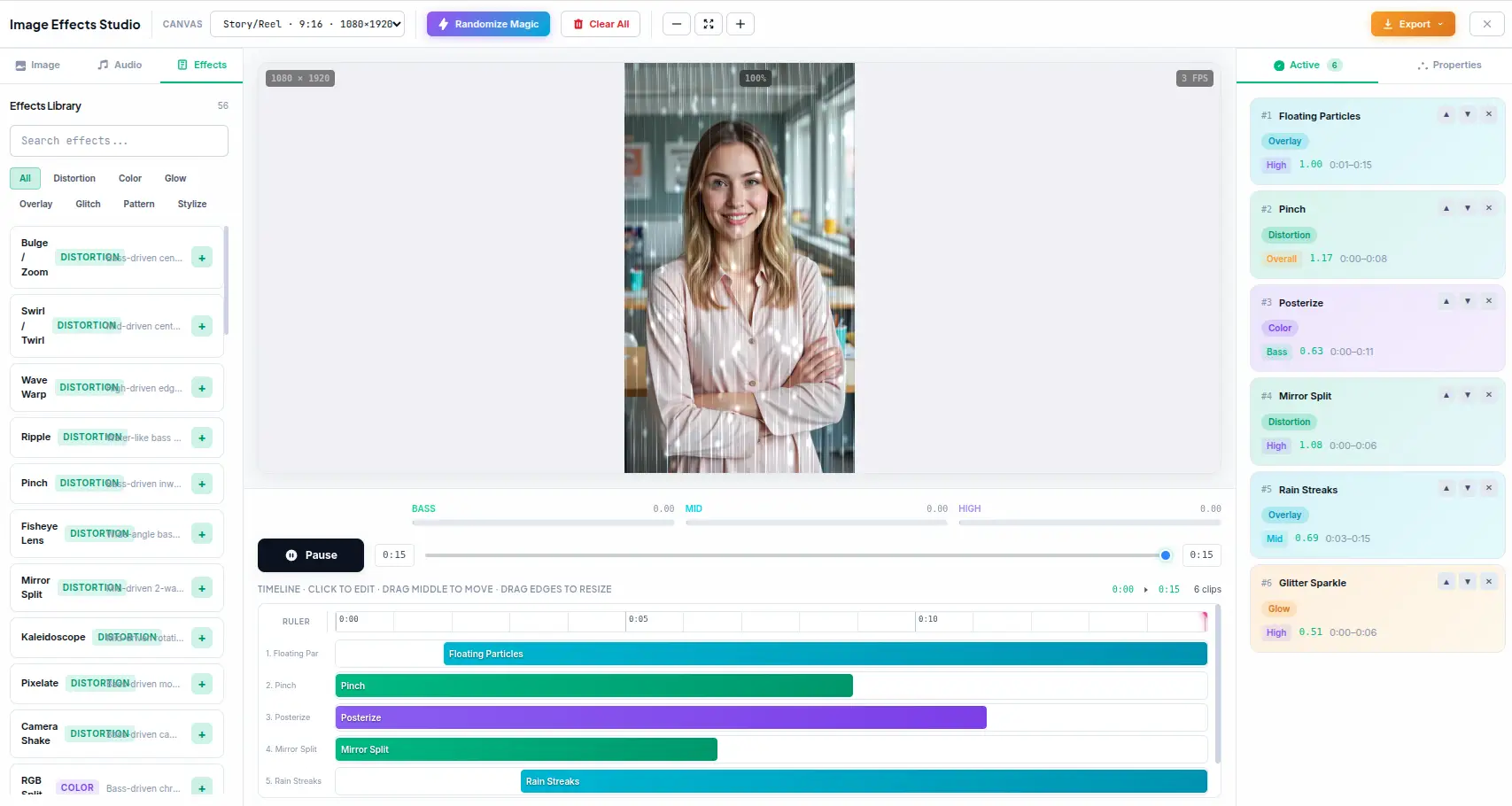
What Are Audio-Reactive Effects?
Audio-reactive effects are visual transformations that respond to the frequency spectrum of an audio track in real time. Unlike static filters, audio-reactive effects analyze the audio signal — splitting it into bass, mid, and treble frequency bands — and use those values to modulate visual parameters. Bass might control intensity, mid might control speed, treble might control scale. The result is animated visuals that dance, pulse, and shift in sync with the music.
GLSL Shader Effects
Each effect is a GLSL fragment shader that runs on the GPU via PixiJS. The shader receives audio frequency data as uniforms and uses it to modulate visual parameters — RGB channels shift with bass, blur radius expands with mid, scale increases with treble. The GPU processes every pixel in parallel at 60fps for real-time audio-reactive rendering.
Audio Frequency Bands
The audio system splits the frequency spectrum into three bands using Web Audio API FFT analysis. Bass (0-10%) captures kick drums, basslines, and low-frequency energy. Mid (10-40%) captures vocals, synths, and melodic content. Treble (40-100%) captures hi-hats, cymbals, and high-frequency detail. Each band is normalized to [0,1] for stable parameter modulation.
Timeline Sequencing
The timeline arranges effect clips into a sequence. Each clip has its own effect, parameters, and audio mapping. Drag to reorder, resize to adjust duration, zoom for precision. Clips can overlap for transitions or play sequentially for progressive effects. The timeline supports frame-level editing at any zoom scale.
Video & Image Export
Export animated effects as MP4 (H.264 + AAC audio) or WebM (VP9 + Opus audio) video files. Capture still frames as PNG (lossless) or JPG (compressed). Video export uses WebCodecs for hardware-accelerated encoding — no server upload, no processing queue. Configurable resolution, frame rate, and quality.
How Audio-Reactive Effects Work
From audio file to animated output — the real-time pipeline that makes effects dance to music.
Load Audio
Upload an MP3, WAV, OGG, or AAC file. The Web Audio API decodes it into a PCM buffer locally — no server upload.
FFT Analysis
AnalyserNode splits the frequency spectrum into 128 bins. Bins are grouped into bass (0-10%), mid (10-40%), and treble (40-100%).
Band Mapping
Each band is normalized to [0,1] and smoothed over time. The audio map assigns bass, mid, or treble to specific effect parameters.
GLSL Rendering
The PixiJS shader receives audio uniforms and modulates effect parameters in real time at 60fps on the GPU.
Default Audio Maps
Each effect ships with a default audio map that maps frequency bands to the most visually impactful parameters. For example, RGB Split maps bass to red offset, mid to green offset, and treble to blue offset. Chromatic Aberration maps bass to distortion amount, mid to angle, and treble to scale. You can override these defaults per clip.
Everything You Need for Audio-Reactive Effects
Every effect, audio control, and export option you need — all rendered in your browser with PixiJS.
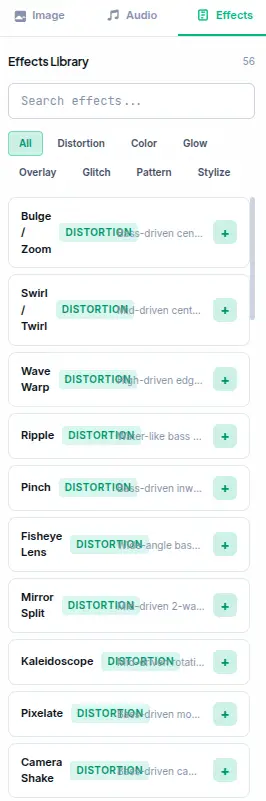
56 Audio-Reactive Effects
GLSL shaders across 7 categories — Distortion, Color, Glow, Overlay, Glitch, Pattern, and Stylize. Each effect responds to audio frequencies in real time, creating animated visual reactions to your music. Effects include RGB split, chromatic aberration, pixel sorting, light leaks, film grain, vignette, and more.
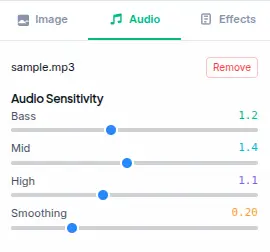
Audio Frequency Analysis
Real-time audio analysis splits the frequency spectrum into bass (0-10%), mid (10-40%), and treble (40-100%) bands using Web Audio API FFT analysis. Each band is normalized to [0,1] and smoothed over time. The normalized values drive effect parameters — bass controls intensity, mid controls speed, treble controls scale.
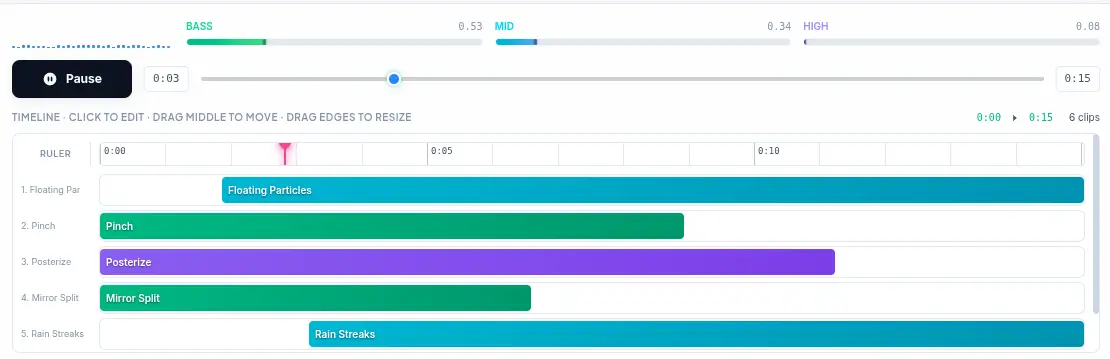
Timeline Sequencing
Arrange effect clips on a visual timeline. Drag to move clips, resize edges to adjust duration. Each clip can have different effects, parameters, and audio mappings. The timeline supports zoom for precise editing at any scale. Clip duration ranges from 0.5 seconds to 60 seconds per clip.
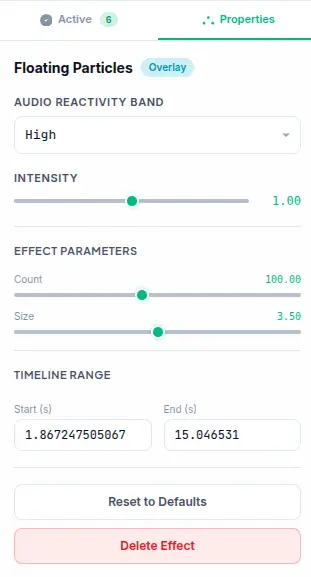
Per-Effect Parameters
Every effect exposes adjustable parameters — intensity, speed, scale, hue shift, blur amount, and more. Each parameter can be mapped to an audio band for reactive control. Adjust parameters in real time while the effect plays. Full undo/redo history tracks every parameter change.
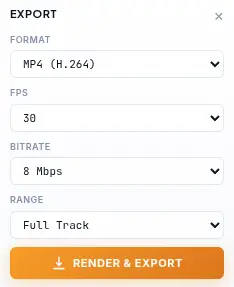
Export as Video or Image
Export animated effects as MP4 video (H.264 with AAC audio), WebM video (VP9 + Opus), or capture still frames as PNG or JPG images. Video export uses WebCodecs for hardware-accelerated encoding — no server upload, no processing queue. Configurable resolution, frame rate, and quality.
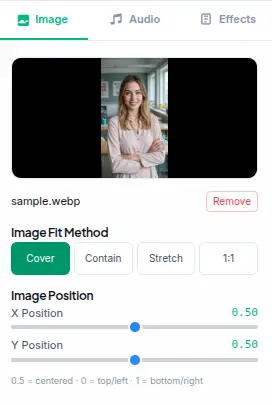
Canvas Presets & Fit Modes
Pre-configured canvas sizes for Instagram (1080x1080, 1080x1920), TikTok (1080x1920), YouTube (1920x1080, 1280x720), Twitter (1200x675), and Facebook (1200x630). Image fit modes include cover, contain, stretch, and 1:1. Custom canvas dimensions for any output size.
See the Difference
Drag the slider to compare the original photo with the effects applied. Every effect runs in real-time using WebGL — no upload, no waiting.


What Makes It Different
Not a static filter app — a GPU-accelerated audio-reactive effects studio with real-time GLSL shaders.
Real-Time Audio Analysis
The audio system uses Web Audio API AnalyserNode with FFT size 256 (128 frequency bins). The spectrum is split into bass (bins 0-10%), mid (bins 10-40%), and treble (bins 40-100%). Each band is normalized to [0,1] and smoothed over time for stable modulation. Audio data maps to parameters with up to 40% range modulation.
GPU-Accelerated GLSL Shaders
All effects run on the GPU via PixiJS GLSL fragment shaders. Each effect is a mathematical function that processes pixels in parallel at 60fps. The shader pipeline receives audio frequency data as uniforms, enabling real-time audio-reactive rendering without CPU bottlenecks.
Multi-Clip Timeline
Each clip on the timeline has its own effects, parameter values, and audio mapping. Clips can be duplicated, reordered, and resized independently. The timeline zoom (10-200 px/s) provides frame-level precision for aligning clips to audio beats or specific timestamps.
No Account, No Upload, No Trace
No signup, no login, no data collection. The tool works entirely in your browser session. Audio files are decoded locally via Web Audio API and never sent to any server. Closing the tab clears all processed data.
Perfect for any project
From video intros to live streaming — audio-reactive effects for any scenario with the right export format.
Video Intros & Outros
Create audio-reactive animated effects for YouTube intros, podcast openers, or Twitch stream overlays. Export as MP4 with audio and import directly into your video editor. The audio-reactive mode ensures effects match the rhythm of your soundtrack.
Social Media Content
Generate eye-catching animated effects for Instagram Reels, TikTok, or Twitter/X posts. The 9:16 and 1:1 aspect ratio presets match platform requirements. Audio-reactive effects paired with music create engaging short-form content.
Live Streaming Overlays
Use audio-reactive effects as real-time overlays for OBS, Streamlabs, or vMix. The GPU-accelerated rendering maintains 60fps performance without impacting stream quality. Export transparent WebM video loops for compositing.
Music Visualizers
Create visual reactions to audio frequencies — bass drops trigger intensity spikes, treble creates shimmer effects, mid drives rotation speed. Export as MP4 or WebM video with the original audio track included.
Game & App Visuals
Generate animated effects for game menus, loading screens, or app interfaces. The GLSL shaders produce visually rich animations that respond to audio input. Export as video loops or capture frames for sprite sheets.
Motion Graphics & VJ Loops
Build VJ loops for live visuals, projection mapping, or art installations. The timeline composer lets you arrange multiple effects into a sequence, and audio reactivity syncs the visuals to music.
Blog & Website Headers
Replace static header images with subtle audio-reactive animations. Export as MP4 for HTML5 video backgrounds or capture optimized JPG frames. Animated effects add visual depth to landing pages.
Education & Demos
Create animated effects for educational video content, coding tutorials, or software demos. The parameter controls let you demonstrate concepts like shader programming and audio analysis in real time.
Four steps to reactive visuals
From uploaded media to audio-reactive export in under a minute.
Upload Image & Audio
Drop your media files onto the canvas or click to browse. Supports PNG, JPG, WebP images and MP3, WAV, OGG, AAC audio. The image loads as the background layer; audio decodes locally via Web Audio API for frequency analysis.
Browse Effects Library
Browse 56 presets across 7 categories — Distortion, Color, Glow, Overlay, Glitch, Pattern, and Stylize. Click any effect to add it to the timeline. Each effect loads with default parameters and audio mapping.
Sequence on Timeline
Drag clips to arrange when each effect activates. Resize edges to adjust duration. Select a clip to adjust its parameters and audio mapping. Each clip can have unique effects, parameter values, and timeline ranges.
Export & Share
Click Export and choose between MP4 (H.264 + AAC audio), WebM (VP9 + Opus), PNG (still frame), or JPG (compressed). Video export uses WebCodecs for hardware-accelerated encoding. Configure resolution, frame rate, and quality before exporting.
Frequently Asked Questions
Answers to common questions about audio reactivity, GLSL shaders, and export formats.
Is Image Effects Generator really free?
Yes. There are no hidden costs, no signup requirement, and no watermark on exports. All 56 effects, audio analysis, timeline sequencing, and video export are available at no charge with no premium tiers.
Are my audio files uploaded to a server?
No. Audio files are decoded locally in your browser using the Web Audio API. They are never sent to any server. The entire audio analysis pipeline — FFT processing, frequency band extraction, and parameter modulation — runs client-side.
What export formats are available?
Image Effects Generator supports four export formats: MP4 (H.264 + AAC audio), WebM (VP9 + Opus audio), PNG (lossless still frame), and JPG (compressed still frame). Video exports include the original audio track and support configurable resolution, frame rate, and quality.
How does audio reactivity work?
The audio system uses Web Audio API AnalyserNode with FFT size 256 (128 frequency bins). The spectrum is split into three bands: bass (bins 0-10%), mid (bins 10-40%), and treble (bins 40-100%). Each band average amplitude is normalized to [0,1] and smoothed over time. The normalized values modulate mapped parameters by up to 40% of their full range.
What audio formats are supported?
Image Effects Generator supports MP3, WAV, OGG, AAC, and any other format that the browser Web Audio API can decode. In practice, this covers virtually all common audio formats. The audio file is decoded into a PCM buffer for analysis.
What are the 7 effect categories?
Distortion (RGB split, chromatic aberration, wave, twist), Color (hue shift, saturation, brightness, contrast, invert), Glow (bloom, lens flare, light rays), Overlay (film grain, dust, scratches, vignette), Glitch (pixel sort, data mosh, block shift), Pattern (dots, lines,网格, halftone), and Stylize (cartoon, sketch, emboss, oil paint).
Can I use exported videos commercially?
Yes. Videos and images exported with Image Effects Generator are yours to use for any purpose — personal or commercial. No attribution is required. Use them for video production, social media, marketing, or any other commercial application.
What is the maximum export resolution?
Video export supports up to 1920x1080 (1080p) resolution. Still frame export captures at the current canvas resolution, which defaults to 1280x720. Custom canvas dimensions can be set for any output size within browser memory limits.
How many clips can I add to the timeline?
There is no hard limit on the number of clips. Each clip can be 0.5-60 seconds long, and clips are arranged sequentially on the timeline. The total composition length is determined by the end time of the last clip. Practical limits depend on browser memory.
Does this work on mobile?
Image Effects Generator works best on desktop browsers with WebGL and Web Audio API support. Mobile browsers may have limited performance for real-time GLSL rendering. The tool includes responsive design for tablet and phone screens.
Ready to Create?
Upload an image and audio, add audio-reactive effects, and export as WebM, MP4, PNG, or JPG — all in your browser.