
Create Stunning
Custom QR Codes
A professional QR code generator that runs entirely in your browser. Design QR codes with custom colors, dot styles, frames, and logos — then verify they scan correctly before you export. No signup, no watermark, no data leaving your device.
Free forever. No signup required. Works in your browser.
What Is a QR Code?
A QR code (Quick Response code) is a two-dimensional matrix barcode that stores data in a grid of black-and-white squares. Unlike traditional barcodes that encode data in parallel lines, a QR code encodes information in both horizontal and vertical directions — which is why it can hold significantly more data.
Structure
Every QR code contains three large squares in the corners called finder patterns. These allow scanners to locate and orient the code instantly, regardless of angle. The remaining grid holds data modules (the smaller squares), alignment patterns for larger codes, timing patterns that help the scanner calibrate, and error correction data that lets the code survive damage or obstruction.
Error Correction
QR codes use Reed-Solomon error correction, which generates redundant data so the code can be read even if parts are damaged, dirty, or covered. There are four levels — L (7%), M (15%), Q (25%), and H (30%). At the highest level (H), up to 30% of the code can be destroyed and it will still scan correctly. This is why embedding a logo in the center of a QR code works without breaking it.
Scanning
When you point your phone's camera at a QR code, the scanning software detects the three finder patterns, determines the code's orientation, reads the data modules, applies error correction if needed, and decodes the stored information — whether that's a URL, WiFi credentials, contact details, or any other data type. The entire process takes milliseconds on modern devices.
QR Codes vs. Barcodes
Traditional barcodes (like those on product packaging) store data in one dimension — a series of thin and thick lines. They typically hold 20–25 characters. QR codes are two-dimensional and can store up to 7,089 numeric characters or 4,296 alphanumeric characters. They also support binary data, kanji characters, and multiple encoding modes within a single code.
How QR Codes Work
From camera to decoded data — the process that happens in milliseconds every time someone scans a QR code.
Detection
The camera detects the three finder patterns — the large squares in the corners — and determines the code's position and orientation in the frame.
Alignment
The timing patterns and alignment patterns help the scanner map the grid correctly, even if the code is viewed at an angle or on a curved surface.
Decode
Each module (square) is read as a binary 1 or 0. The format information tells the scanner which encoding mode is used — numeric, alphanumeric, byte, or kanji.
Error Correction
Reed-Solomon error correction checks for damage or obstruction. At level H, up to 30% of the code can be covered and still decode correctly.
Why Custom QR Codes Still Scan
A common concern with custom QR codes — adding colors, logos, rounded dots, or decorative frames — is whether they'll still scan reliably. The answer is yes, provided the contrast between foreground and background remains sufficient and the error correction level is appropriate. QR Code Studio handles this automatically: when you add a logo, the error correction is bumped to level H, and the built-in scan test verifies scannability before you export. The finder patterns, which are what scanners rely on for initial detection, are never modified by cosmetic customization.
A Brief History of QR Codes
From tracking car parts to connecting the physical and digital worlds — the story of the QR code spans over three decades.
Invention by Denso Wave
The QR code was invented in 1994 by Masahiro Hara, an engineer at Denso Wave — a subsidiary of Toyota. The original purpose was to track automotive parts through the manufacturing process. Traditional barcodes were too slow and couldn't hold enough data for the complex component tracking Toyota needed.
Adoption in Japan
Throughout the early 2000s, QR codes became widespread in Japan. Mobile phones began including built-in QR scanners, and the codes appeared on everything from train tickets to restaurant menus. By 2005, QR codes were a standard part of Japanese commercial infrastructure.
Global Smartphone Adoption
As smartphones with cameras became ubiquitous worldwide, QR codes followed. Apple added native QR scanning to the Camera app in iOS 11 (2017), and Android devices had supported it even earlier. What was once a Japanese logistics tool became a global communication medium.
Pandemic and Beyond
COVID-19 accelerated QR code adoption globally. Contactless menus, vaccine passports, and digital check-ins made QR codes a part of daily life. By 2023, over 89 million US smartphone users had scanned a QR code, and the number continues to grow. Today, QR codes serve as a bridge between physical objects and digital content — from product packaging to public transit, from business cards to charity donations.
Everything You Need
Every feature you need to design, customize, and export production-ready QR codes — without leaving your browser.
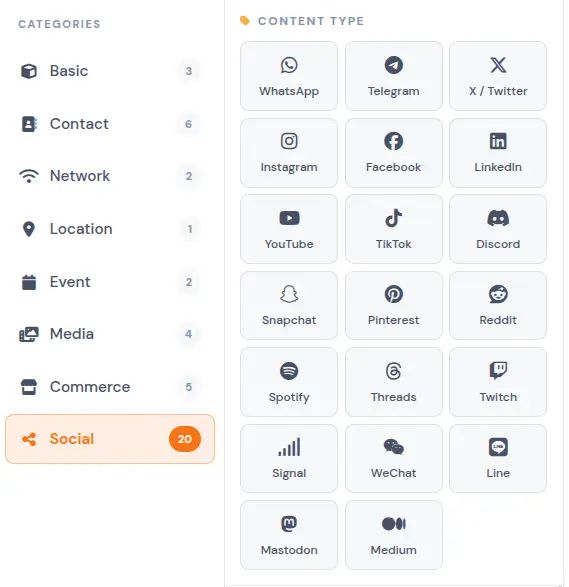
30+ Content Types
Each content type — URL, WiFi, vCard, MeCard, email, SMS, phone, crypto wallets, PayPal, SEPA, ACH, calendar events, app store links, and 20+ social platforms — has a dedicated form with validation and a live encoding preview that shows exactly what data will be stored in the QR code.
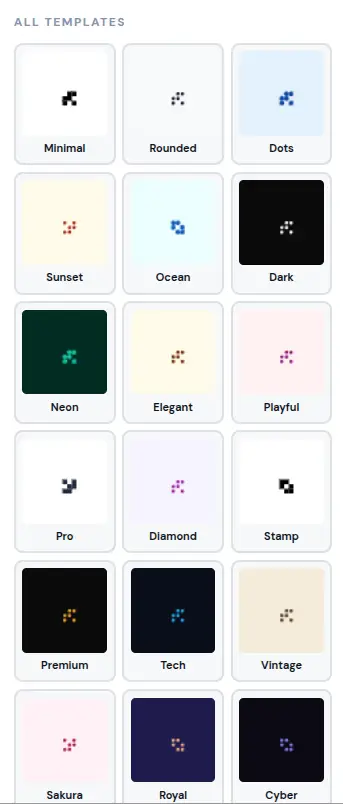
20+ Designer Templates
Pre-built templates with verified contrast ratios — Minimal, Royal, Cyber, Sakura, Premium, and text-labeled presets like "Scan WiFi", "Business Card", and "Special Offer". Each template has been tested against WCAG contrast guidelines to ensure reliable scanning across devices.
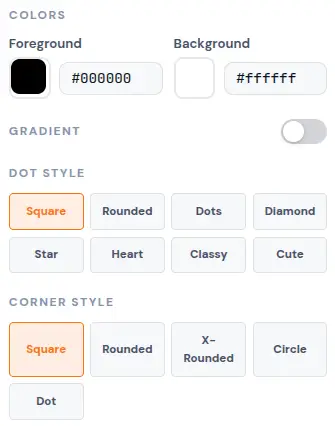
8 Dot Styles · 5 Corner Styles
Choose from square, rounded, dots, diamond, star, heart, classy, or cute dots — and pair them with square, rounded, extra-rounded, circle, or dot finder patterns. The combination of dot and corner styles gives you control over the visual identity of each QR code.
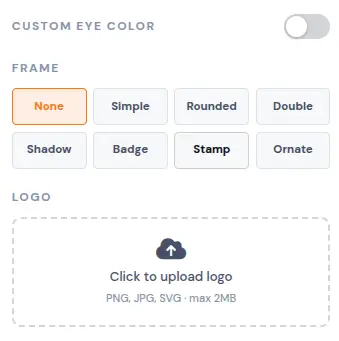
Frames, Eye Colors & Logo
8 frame styles (Simple, Rounded, Double, Shadow, Badge with custom text, Stamp, Ornate, None), custom colors for each of the three finder patterns, and logo embedding with PNG/JPG/SVG support up to 2MB. When a logo is added, the error correction is automatically set to High (30% recovery) for dependable scanning.
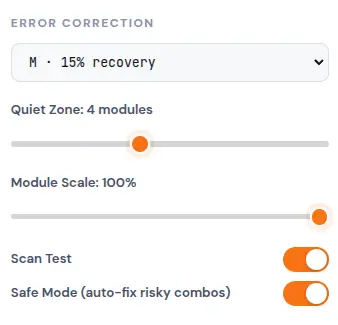
Safe Mode + Scan Test
A WCAG contrast checker, decorative-dot fill analyzer, quiet-zone enforcer, and logo size guard work together to evaluate your QR code before export. Safe Mode detects risky combinations — low contrast, missing quiet zones, oversized logos — and auto-adjusts error correction, contrast, and spacing to fix them.
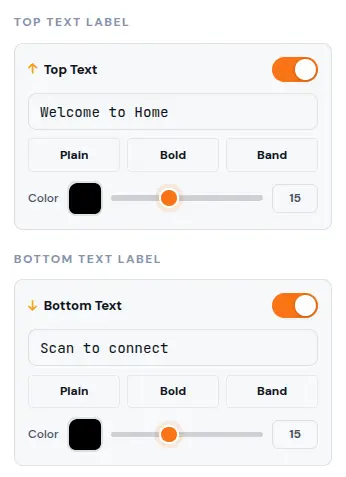
Top & Bottom Text Labels
Add a headline or call-to-action above or below the QR code in three styles: plain, bold, or band (text inside a colored pill). Each label has independent font size, color, and content controls. Useful for prompts like "Scan for WiFi" or "Visit Our Website" without requiring a separate frame.
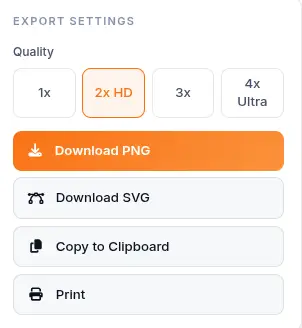
Professional Export
Download as PNG at 1x, 2x, 3x, or 4x resolution (up to 4K), export as infinitely scalable SVG for print, copy directly to clipboard, or print with one click. No watermark, no compression artifacts, no export limits.
What Makes It Different
Not a basic QR code generator — a design tool with built-in validation and browser-level privacy.
100% Browser-Based
Every QR code is generated using Canvas and WebAssembly inside your browser. No data is sent to any server. This matters for sensitive content — WiFi passwords, payment links, personal vCards — because the information never leaves your device. There is no account to create, no data retention policy to worry about, and no third-party access to your codes.
Built-in Scan Test
Before you export, the scan test evaluates your QR code against four criteria: WCAG contrast compliance between foreground and background, decorative-dot fill density, quiet-zone adequacy, and logo size proportionality. Each criterion is checked in real time and the result is displayed as a pass/fail verdict with specific details if something needs adjustment.
Safe Mode Auto-Fix
When enabled, Safe Mode monitors your design choices and applies automatic corrections when it detects combinations that could reduce scannability. It increases error correction when a logo is added, adjusts contrast when colors are too similar, enforces minimum quiet zones, and flags decorative fills that may interfere with scanning. Each fix includes a notification explaining what changed.
Flexible Export Options
PNG at multiple resolutions for digital use, SVG for print and merchandise, clipboard copy for quick sharing, and direct printing. SVG files maintain mathematical precision at any scale, which is what print shops and merchandise manufacturers require. PNG exports use lossless compression with no watermark overlay.
Perfect for any project
From restaurant menus to healthcare signage — generate QR codes for any use case with the right content type and styling.
Restaurant Menus
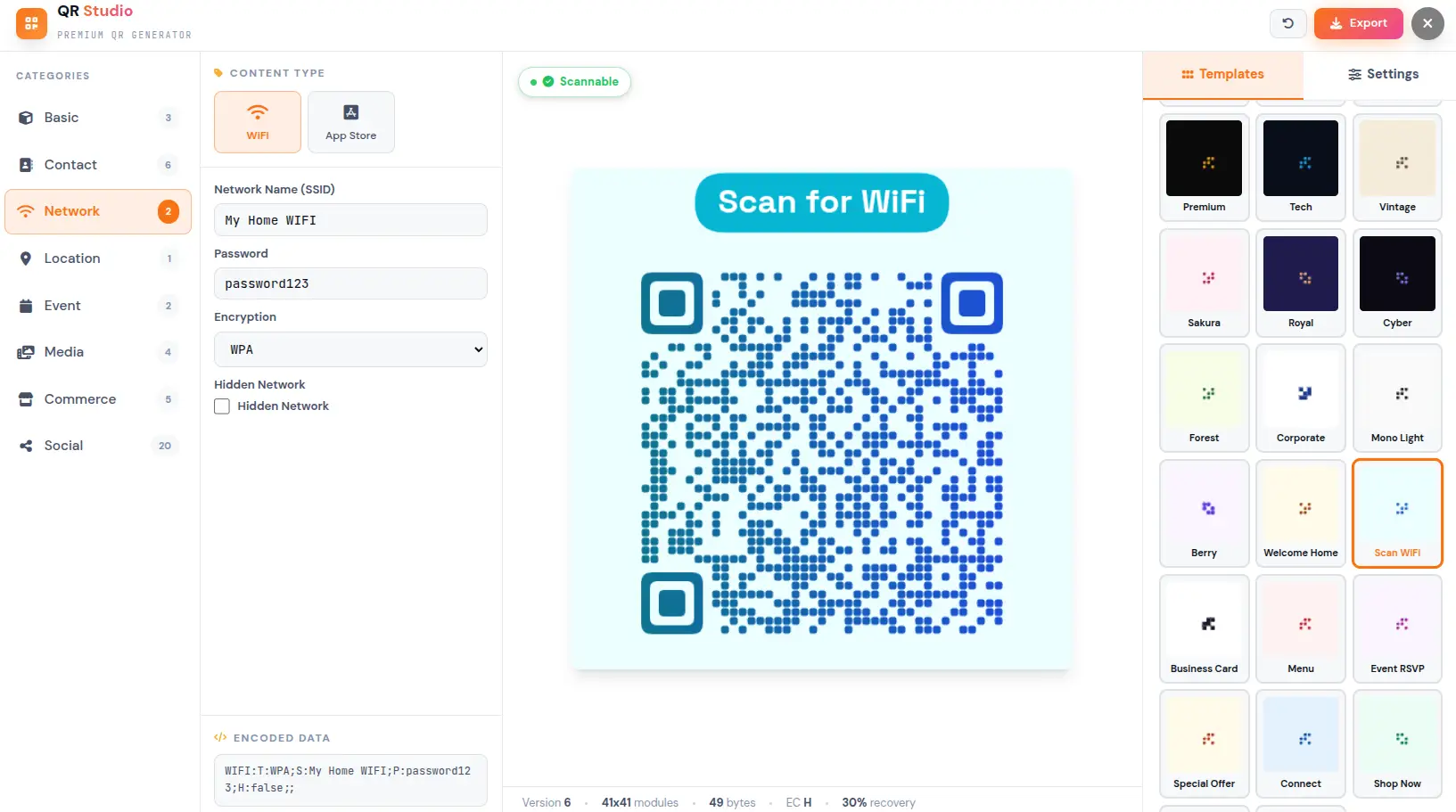
Generate "Scan for WiFi" or "Restaurant Menu" QR codes with pre-built text-labeled templates. Customers scan once and instantly access your menu, ordering system, or WiFi network. The "Scan WiFi" template includes a colored band label that makes the code instantly recognizable on tables, receipts, or window displays.
Business Cards
Embed a vCard with your full contact info — name, phone, email, organization, title, website, and address. Recipients scan and save your details to their address book without typing anything. The "Business Card" template adds a professional frame with your name as a text label.
WiFi Access Points
Create WiFi QR codes for cafés, hotels, co-working spaces, and Airbnbs. Guests scan to connect — no password typing, no asking staff, no sharing aloud. Supports WPA, WEP, and open networks with a hidden SSID option for additional security.
Payment Links
Accept PayPal, SEPA bank transfers, or ACH payments via scannable QR codes. Suitable for invoices, tip jars, fundraisers, marketplace listings, and small businesses. Each payment type generates a standardized format compatible with major banking and payment apps.
Social Media
Drive followers with QR codes for Instagram, TikTok, WhatsApp, Telegram, X/Twitter, LinkedIn, YouTube, Discord, Spotify, Snapchat, Pinterest, Reddit, Twitch, Signal, WeChat, Line, Mastodon, Medium, and more. Each platform gets a dedicated content type with the correct URL format for immediate redirection.
Event RSVPs
Create calendar event QR codes with title, start/end time, location, and description. Recipients scan and their calendar app opens with all details pre-filled — ready to accept or decline. Works with Google Calendar, Apple Calendar, and Outlook.
Healthcare & Safety
Link patients to appointment portals, medication instructions, safety data sheets, or emergency procedures. QR codes on wristbands, prescription labels, or facility signage provide instant access to critical information without requiring staff intervention.
Education
Embed QR codes in textbooks, worksheets, or lab materials to link students to supplementary videos, interactive exercises, or answer keys. Teachers can generate unique codes per assignment for attendance tracking or resource distribution.
Four steps to a perfect QR code
From idea to scannable code in under a minute.
Choose a Content Type
Select from 8 categories — Basic, Contact, Network, Location, Event, Media, Commerce, and Social. Each category contains multiple types with dedicated form fields designed for that specific data format.
Enter Your Data
Fill in the form — URL, WiFi credentials, vCard fields, payment details, or calendar event info. The encoded data preview at the bottom updates in real time so you can verify exactly what the QR code will contain before exporting.
Style and Customize
Apply a one-click template for quick professional results, or open the Settings panel to adjust colors, gradients, dot style, corner style, frame, eye colors, logo, error correction, quiet zone, and text labels individually.
Export
Download as PNG (up to 4K), SVG (scalable vector), copy to clipboard, or print directly. No watermark, no signup, no export limits. The file is ready for immediate use in print or digital workflows.
Frequently Asked Questions
Answers to common questions about QR codes, customization, scanning, and export.
Is QR Code Studio really free?
Yes. There are no hidden costs, no signup requirement, and no watermark on exports. All QR code generation happens locally in your browser — every feature is available at no charge, with no premium tiers or paywalls.
Are my QR codes stored on a server?
No. Every QR code is generated entirely in your browser using Canvas and WebAssembly. Your data never leaves your device, making QR Code Studio suitable for sensitive information like WiFi passwords, payment links, and personal vCards.
Can I use QR codes generated here commercially?
Yes. QR codes generated with QR Code Studio follow the open QR code specification (ISO/IEC 18004) and produce universally scannable codes. You can use them for marketing campaigns, product packaging, business cards, merchandise, signage, invoices, or any commercial purpose — no attribution required.
What's the difference between QR codes and barcodes?
Traditional barcodes (like UPC codes on product packaging) encode data in a single dimension — a series of parallel lines. They typically hold 20–25 characters. QR codes are two-dimensional and can store up to 7,089 numeric characters or 4,296 alphanumeric characters. QR codes also support binary data, kanji characters, and multiple encoding modes, which is why they can store URLs, WiFi credentials, and complex contact information.
Can I track how many times my QR code is scanned?
QR Code Studio generates static QR codes, which means the data is encoded directly in the code itself. Static codes cannot track scan counts because they do not communicate with any server. To track scans, you would need a dynamic QR code service that redirects through a tracking URL. You can create a tracking URL externally and then encode that URL in a QR code generated here.
Do QR codes expire?
QR codes generated by QR Code Studio do not expire. Since the data is encoded directly in the code and there is no server involved, the code will remain scannable indefinitely — as long as the destination URL or content remains accessible. If you encode a URL that later goes offline, the QR code will still scan but the destination will be unavailable.
What's the difference between PNG and SVG export?
PNG is a raster format (pixels) suitable for digital use — websites, social media, email signatures, and messaging apps. SVG is a vector format defined by mathematical paths, which means it scales infinitely without quality loss. For anything that will be physically printed — business cards, posters, merchandise, signage — SVG is the recommended format.
How do I add a logo to my QR code?
Open the Logo section in the Settings panel and upload a PNG, JPG, or SVG file (maximum 2MB). The logo is placed in the center of the QR code with a clean background. QR Code Studio automatically adjusts the error correction level to High (30% recovery) when a logo is added, which ensures the code remains scannable despite the logo covering part of the data area.
Will my QR code still scan with a logo embedded?
Yes. QR codes use Reed-Solomon error correction, which allows up to 30% of the code to be obscured while remaining fully scannable. When a logo is added, Safe Mode verifies that the logo does not exceed the safe size threshold for the selected error correction level. The result is a branded QR code that scans reliably on all modern devices.
What content types are supported?
QR Code Studio supports 30+ content types across 8 categories: Basic (URL, Plain Text, Email, SMS, Phone Number), Contact (vCard, MeCard), Network (WiFi), Location (Geo Coordinates), Event (Calendar Event), Media (YouTube, Spotify), Commerce (PayPal, SEPA Bank Transfer, ACH, Crypto Wallet), and Social (Instagram, TikTok, WhatsApp, Telegram, X/Twitter, LinkedIn, YouTube, Discord, Snapchat, Pinterest, Reddit, Spotify, Threads, Twitch, Signal, WeChat, Line, Mastodon, Medium).
Can I customize the dot style, corners, and colors?
Yes. QR Code Studio offers 8 dot styles (Square, Rounded, Dots, Diamond, Star, Heart, Classy, Cute), 5 corner styles (Square, Rounded, X-Rounded, Circle, Dot), 8 frame styles, foreground and background color pickers with linear and radial gradient support, and custom eye colors for each of the three finder patterns.
How do text labels work?
You can add a top label, bottom label, or both. Each label supports three styles: Plain (standard text), Bold (heavy weight), and Band (text inside a colored pill-shaped background). Font size (11–22px), color, and content are configurable independently for each label. Labels provide context like "Scan for WiFi" without requiring a separate frame or design element.
What is Safe Mode and how does it work?
Safe Mode is a toggle in the Settings panel that monitors your design choices in real time. It checks WCAG contrast ratios between foreground and background colors, enforces minimum quiet zones around the code, adjusts error correction levels when logos are present, and analyzes decorative dot fills for scannability. When an issue is detected, Safe Mode applies an automatic fix and notifies you with a description of what changed.
Ready to Create?
Generate fully customizable QR codes in seconds. 30+ content types, 20+ templates, built-in scan verification, and professional export.
Try more free tools
Photo Collage Maker
Professional collage maker with 50+ templates
Background Generator
Audio-reactive animated background studio
Background Remover
AI-powered bulk background removal
Image Editor
Professional batch image editor with advanced tools