
Bend Reality.
Reshape Anything.
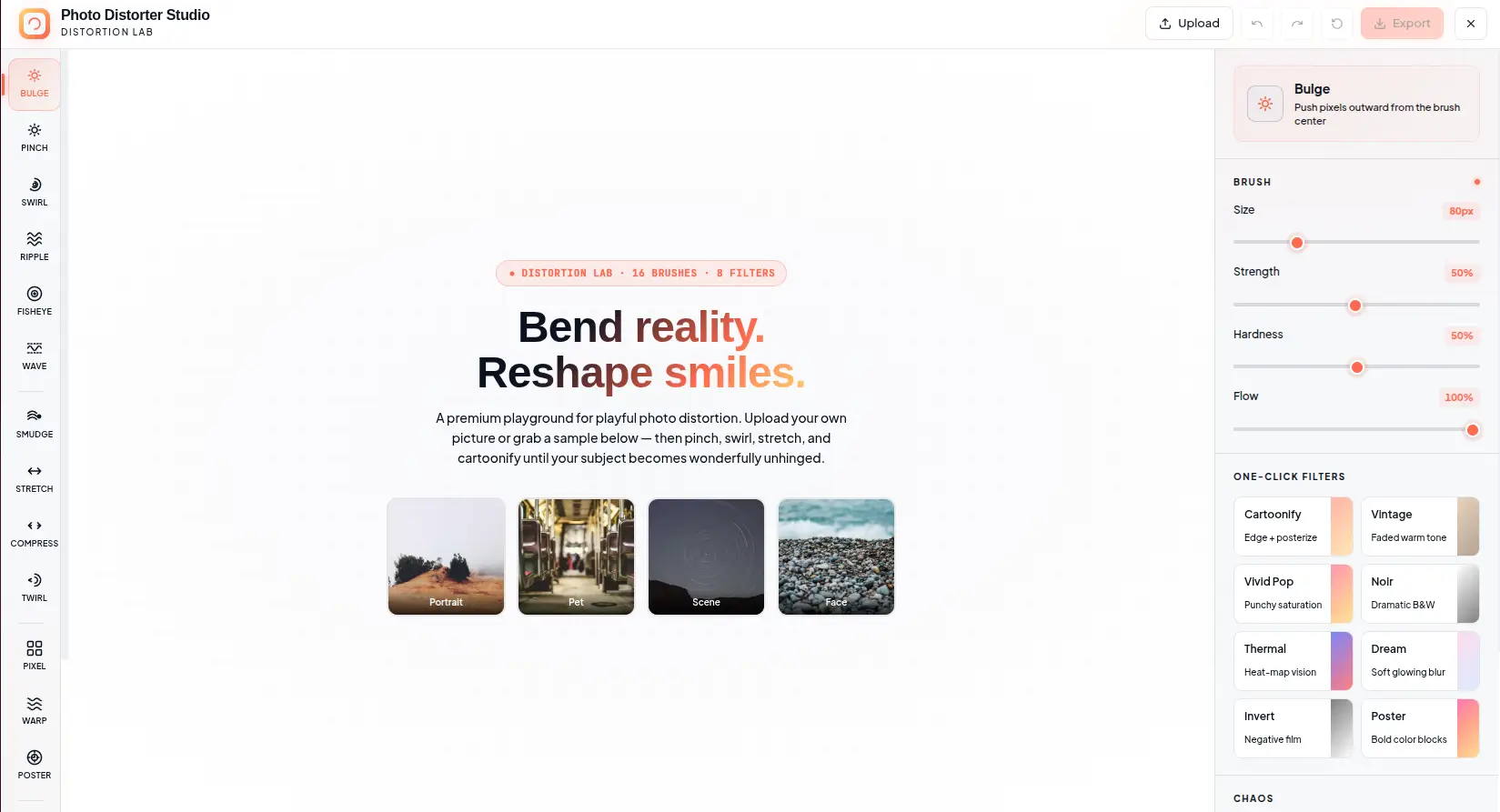
16 distortion brushes and 8 one-click filters. Bulge, pinch, swirl, smudge, and cartoonify any image — all running in your browser with real-time WebGL shaders. No signup, no upload, no watermark.
Free forever. No signup required. Works in your browser.
What Is Image Distortion?
Image distortion is the deliberate manipulation of pixel positions to create visual effects — warping, stretching, swirling, or otherwise transforming the appearance of an image. Unlike simple filters that adjust color or brightness, distortion tools physically move pixels from their original locations, creating geometric transformations that alter the shape and structure of the image content.
Warp Brushes
Warp brushes displace pixels based on distance from the brush center. Bulge pushes pixels outward from the center; pinch pulls them inward; twirl rotates around the center point; swirl combines rotation with radial displacement. Each brush uses a mathematical function that calculates the new position of every pixel within the brush radius.
Drag Brushes
Drag brushes move pixels in the direction of your stroke. Smudge drags pixels along the stroke path with configurable flow; stretch elongates pixels perpendicular to the stroke; scatter randomizes pixel positions within the brush radius. These brushes mimic traditional media techniques like finger painting and charcoal smudging.
Style Brushes
Style brushes apply visual effects that combine distortion with color manipulation. Emboss creates a raised 3D effect by detecting edges and adding highlights/shadows. Oil paint simulates brush strokes by averaging pixel colors in directional patterns. Pixelate reduces resolution by averaging pixel blocks, creating a retro low-fi aesthetic.
Color Filters
One-click filters apply GPU-accelerated color transformations to the entire image. Cartoonify reduces color palette and adds edge detection for a cel-shaded look. Thermal maps brightness to a heat gradient. Noir converts to high-contrast grayscale. Each filter processes the image in real time using WebGL fragment shaders.
How Distortion Brushes Work
From mouse input to GPU-rendered output — the real-time pipeline that powers brush-based distortion.
Input Capture
Mouse or touch events capture position, pressure, and velocity. The brush center and radius are calculated from the input coordinates and brush size parameter.
Shader Execution
The WebGL fragment shader executes for every pixel within the brush radius. It calculates the displacement vector based on the brush type, strength, and distance from center.
Pixel Displacement
Each pixel is displaced according to the shader function. Hardness controls the edge falloff; flow controls accumulation rate; strength scales the displacement magnitude.
Canvas Render
The displaced pixels are written back to the canvas texture. The updated canvas is displayed immediately — the entire pipeline runs at 60fps for real-time feedback.
Brush Parameters Explained
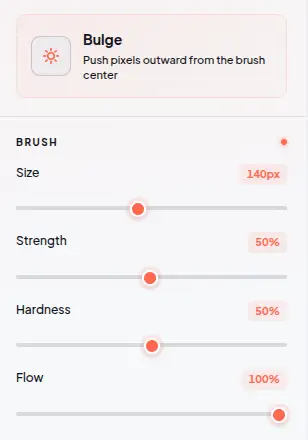
Each distortion brush exposes four adjustable parameters that control how pixels are displaced. Understanding these parameters gives you precise control over the distortion effect.
Everything You Need to Distort
Every brush, filter, and control you need to warp reality — all running locally in your browser.
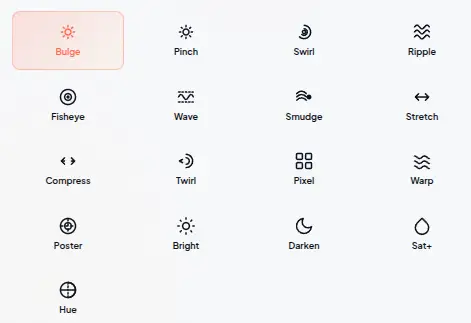
16 Distortion Brushes
Bulge, pinch, swirl, smudge, pixelate, twirl, ripple, wave, stretch, scatter, mirror, Emboss, oil paint, and more — each brush transforms your image in real time using WebGL fragment shaders. Click and drag on the canvas to apply distortions with adjustable brush settings for precision or wild effects.
8 One-Click Filters
Cartoonify, vintage, thermal, noir, sketch, pop art, rgb split, and glitch — apply stunning looks with a single click. Each filter is a GPU-accelerated shader that processes the entire image in real time. Preview results instantly before committing to export.
Full Brush Control
Adjust size (10-500px), strength (1-100%), hardness (0-100%), and flow (1-100%) for precision or wild distortion. Size controls the brush radius; strength determines distortion intensity per stroke; hardness defines edge falloff; flow controls accumulation rate. Each parameter updates the brush preview in real time.
Surprise Me Mode
Click the dice icon to apply a random distortion cocktail — a curated combination of brushes and filters applied with randomized parameters. Each click produces a unique result. Perfect for creative exploration when you do not have a specific effect in mind.
Undo / Redo History
25-step undo/redo history tracks every brush stroke and filter application. Experiment freely without fear of mistakes. The history panel shows each action with a timestamp, so you can jump back to any point in your editing session.
Export as PNG
Save your creation as a high-quality PNG file with one click. The export captures the full resolution of your distorted image at the original canvas dimensions. PNG format preserves all distortion details without compression artifacts.
See the Difference
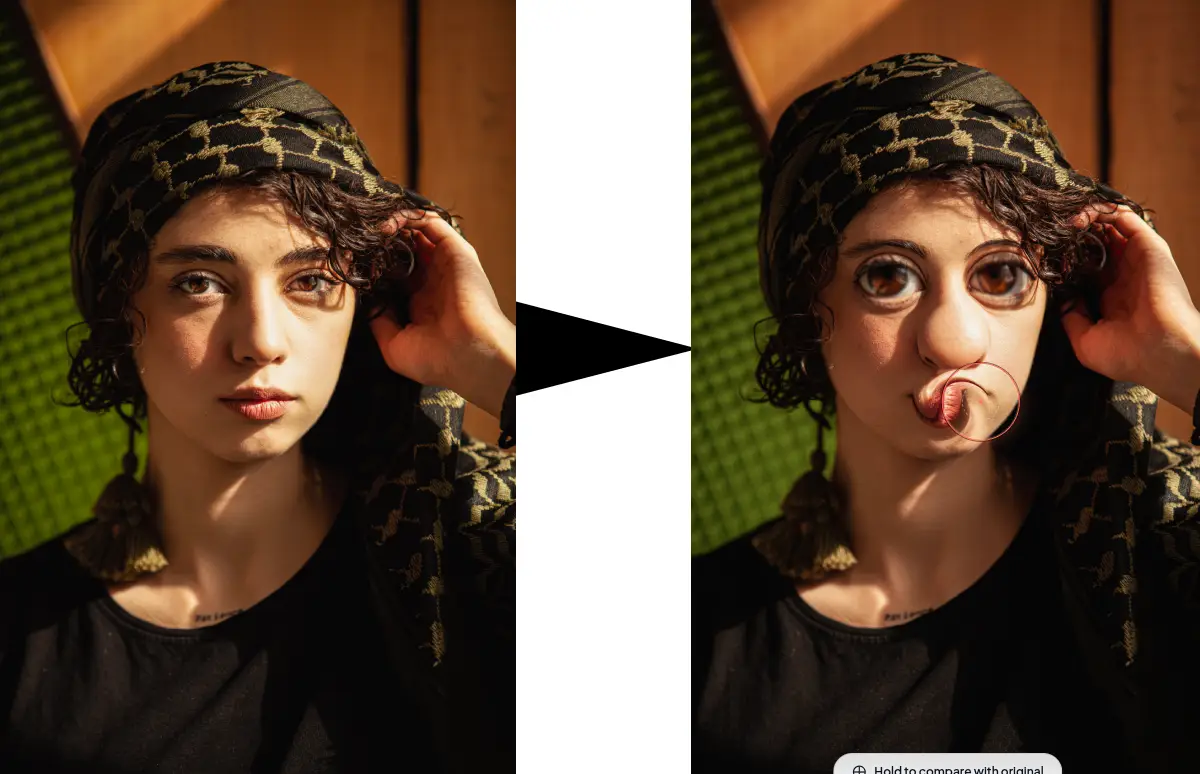
Drag the slider to compare the original photo with the distorted result. Every effect runs in real-time on the GPU — no upload, no waiting.


What Makes It Different
Not a cloud-based editor with upload queues — a GPU-accelerated distortion studio with real-time WebGL shaders.
WebGL Shader Processing
All distortion brushes run on the GPU via WebGL fragment shaders. Each brush is a mathematical function that displaces pixels based on distance from the brush center, direction, and parameter values. This enables real-time processing at 60fps — even on high-resolution images with complex distortions.
Real-Time Canvas Preview
The canvas updates in real time as you paint. Every brush stroke is rendered immediately on the GPU, so you see the exact result before releasing the mouse. No processing queues, no server upload, no waiting — just instant visual feedback as you create.
Non-Destructive Editing
The distortion system preserves the original image throughout the editing session. Each brush stroke creates a new state in the 25-step history. You can undo any action, compare with the original using the space key, or start over without reloading the image.
No Account, No Upload, No Trace
No signup, no login, no data collection. The tool works entirely in your browser session. Closing the tab clears all processed data. There is no server-side storage, no analytics tracking of your images, and no third-party access to your content.
Perfect for any creative project
From funny memes to abstract art — distortion brushes for any creative scenario with the right tools and effects.
Funny Photo Effects
Create hilarious face distortions — bulge heads, pinch noses, swirl eyes, stretch features. Perfect for memes, social media posts, and funny profile pictures. The 16 brushes give you full control over which features to distort and how much.
Abstract Art Creation
Transform photos into abstract artwork using swirl, ripple, wave, and scatter brushes. Combine multiple distortions with filters like oil paint and emboss to create unique digital art pieces. Export as PNG for print or web use.
Creative Photography
Add artistic effects to portraits, landscapes, and still life photos. Use thermal, noir, or vintage filters for cinematic looks. Apply subtle distortions for dreamlike atmospheres or dramatic warps for surreal compositions.
Social Media Content
Create eye-catching posts for Instagram, TikTok, Twitter/X, and Facebook. Distorted images stand out in feeds and generate engagement. Use the surprise me mode for quick creative content when inspiration is low.
Game & Character Design
Create distorted character portraits, warped textures, and psychedelic backgrounds for game assets. The pixelate and scatter brushes produce retro effects suitable for pixel art and indie game aesthetics.
Education & Demonstrations
Demonstrate digital image processing concepts — pixel displacement, shader effects, color manipulation. Use the brush controls to show how parameters affect output. The real-time preview makes it ideal for teaching visual computing.
Digital Art & Illustration
Use distortion brushes as creative tools for digital painting and illustration. Smudge and stretch brushes mimic traditional media techniques. Combine with filters for mixed-media effects that blend photography with painterly styles.
Album Art & Posters
Create distorted visuals for album covers, event posters, and promotional materials. The psychedelic effects — swirl, wave, thermal — produce striking visuals that capture attention. Export at full resolution for print quality.
Four steps to distorted glory
From uploaded image to distorted masterpiece in under a minute.
Upload or Pick a Sample
Drop your own photo onto the canvas, paste from clipboard, or choose from our curated samples to get started instantly. Supports JPEG, PNG, WebP, GIF, and BMP. The image loads at full resolution with the canvas sized to fit your screen.
Choose Your Brush
Pick from 16 distortion tools organized into categories — warp, drag, style, and color. Each brush has a unique effect. Adjust size, strength, hardness, and flow in the control panel. Hover over the canvas to see the brush preview circle.
Paint Your Distortion
Click and drag on the canvas to apply real-time distortions. The GPU shader processes each stroke instantly — no waiting. Use the space key to compare with the original. Undo any stroke with Ctrl+Z or click the undo button.
Export & Share
Click Export to save your creation as a high-quality PNG. The export captures the full resolution of your distorted image. Use the compare button to review your work before exporting. Share the file directly or upload to social media.
Frequently Asked Questions
Answers to common questions about distortion brushes, WebGL rendering, and export formats.
Is Image Distorter really free?
Yes. There are no hidden costs, no signup requirement, and no watermark on exports. All 16 brushes, 8 filters, and export functionality are available at no charge with no premium tiers.
Are my images uploaded to a server?
No. Every image is processed entirely in your browser using WebGL shaders. No image data, metadata, or file content is ever sent to any server. Closing the tab clears all local data.
What image formats are supported?
Image Distorter accepts JPEG, PNG, WebP, GIF, and BMP as input formats. Export is available as PNG (lossless). PNG preserves all distortion details without compression artifacts.
How do the distortion brushes work?
Each brush is a WebGL fragment shader that displaces pixels based on distance from the brush center. Bulge pushes pixels outward; pinch pulls them inward; swirl rotates around the center; smudge drags pixels in the stroke direction. The displacement amount is controlled by the strength parameter.
What is the maximum image resolution?
There is no hard limit on input resolution. The canvas adapts to your screen size while preserving the original image data. High-resolution images (4000px+) may have slightly slower brush performance depending on your device GPU capabilities.
Can I undo multiple steps?
Yes. Image Distorter maintains a 25-step undo/redo history. Every brush stroke and filter application creates a new state. You can undo back to the original image or redo any previously undone action.
How does the compare mode work?
Hold the space key to temporarily show the original unedited image. Release to return to your edited version. This lets you quickly compare your distortions with the original without losing your place in the editing session.
What is the Surprise Me mode?
Surprise Me applies a random combination of brushes and filters with randomized parameters. Each click produces a unique result. It is designed for creative exploration when you do not have a specific effect in mind.
Can I use the keyboard shortcuts?
Yes. Keyboard shortcuts include: [ and ] for brush size, Ctrl+Z for undo, Ctrl+Shift+Z for redo, Space for compare, 1-8 for quick filter selection, and Ctrl+S for export. The shortcuts are designed for power users who prefer keyboard navigation.
Can I use distorted images commercially?
Yes. Images processed with Image Distorter are yours to use for any purpose — personal or commercial. No attribution is required. Use them for social media, marketing, album art, or any other commercial application.
Ready to Get Weird?
Upload a photo and start distorting in seconds. 16 brushes, 8 filters, real-time WebGL — all in your browser.
Try more free tools
QR Code Studio
Professional QR code generator with 30+ content types
Photo Collage Maker
Professional collage maker with 50+ templates
Background Generator
Audio-reactive animated background studio
Background Remover
AI-powered bulk background removal