
Professional Batch
Image Editor
Edit multiple images at once with crop, resize, rotate, watermark, borders, adjustments, and effects. 18 social media presets, per-image overrides, smart crop, and ZIP export — all in your browser. No signup, no upload, no watermark.
Free forever. No signup required. Works in your browser.
What Is Batch Image Editing?
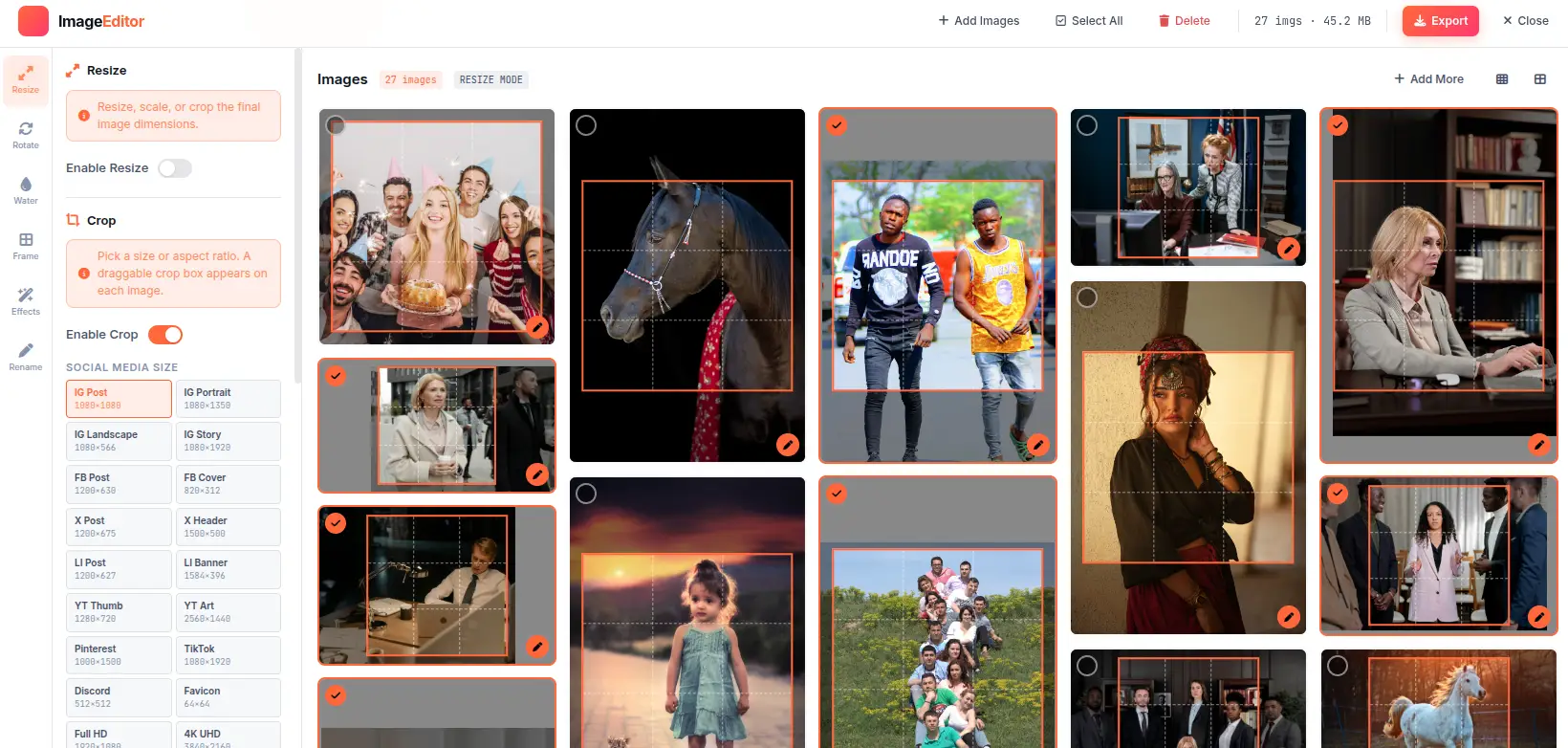
Batch image editing is the process of applying the same set of edits — crop, resize, watermark, color adjustments, filters — to multiple images simultaneously. Instead of editing each image individually, you define a global configuration once and apply it to an entire batch. This is essential for workflows where consistency matters: product photography, social media content, portfolio delivery, and archival processing.
Crop & Resize
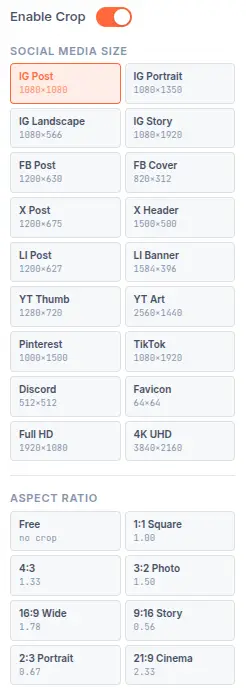
Batch cropping applies consistent aspect ratios or custom dimensions across all images. The 18 social media presets automatically set the correct pixel dimensions for each platform — Instagram 1:1 (1080x1080), YouTube 16:9 (1280x720), TikTok 9:16 (1080x1920). Resize by percentage or target file size with 5 quality methods including iterative compression for exact file size targeting.
Watermarks & Branding
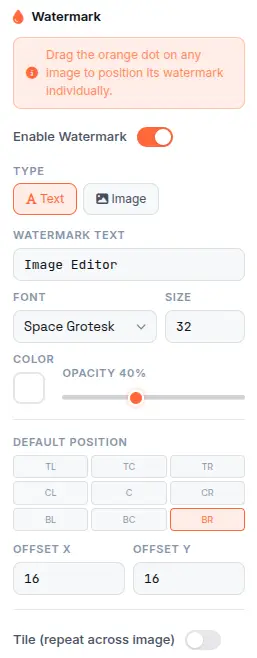
Protect your work or add branding with text or image watermarks. Text watermarks support 30 Google Fonts with custom size, color, opacity, and rotation. Image watermarks use PNG transparency. 9-position grid placement with tile mode for repeating patterns across the entire image. Drag-to-position for precise placement on each image individually.
Adjustments & Effects
Fine-tune the look of every image with brightness, contrast, saturation, hue rotate, and exposure controls — each ranging from -100 to +100. Effects include grayscale, sepia, invert, blur, and vignette for cinematic styling. Apply globally for batch consistency or override per image for individual fine-tuning. Full undo/redo history tracks every change.
Export & Distribution
Export as PNG for lossless quality, JPEG for configurable compression, or WebP for modern web delivery. Batch rename with dynamic patterns: {name}, {index}, {w}, {h}, {date}, {time}. Download individual files or package everything into a single ZIP archive with progress tracking. The ZIP export handles any number of images without browser memory limits.
How Batch Processing Works
From uploaded images to exported files — the client-side pipeline that processes your entire batch without leaving the browser.
Upload & Decode
Images are decoded from file format (JPEG, PNG, WebP, etc.) into raw pixel data using the browser's native image decoding APIs. No server upload — files stay in memory.
Apply Global Edits
The global parameter set (crop, resize, watermark, adjustments, effects) is applied to each image sequentially. Per-image overrides are merged before processing.
Encode & Compress
Processed pixels are encoded to the target format (PNG, JPEG, WebP) with the specified quality. JPEG uses configurable quality 0-100; WebP uses lossy or lossless compression.
Download or ZIP
Exported files are offered as individual downloads or bundled into a single ZIP archive. The ZIP export tracks progress and handles any number of images without memory limits.
Per-Image Override System
The override system lets you customize any parameter on any individual image while keeping global defaults for the rest. When you click the pencil icon on a thumbnail, the per-image editor opens with a live canvas preview. Changes are stored as a delta from the global settings — only modified parameters are overridden. On export, the merged parameter set (global + per-image delta) is applied to each image.
Everything You Need
Every feature you need to crop, resize, watermark, adjust, and export — all running locally in your browser.
Batch Image Processing
Upload and edit unlimited images at once. Drag-and-drop, clipboard paste, or click to browse. Process entire folders in one go — no file count limit, no upload queue, no server processing. Every image is edited locally in your browser using Canvas 2D and OffscreenCanvas for maximum performance.
18 Social Media Presets
One-click crop presets for Instagram (1:1, 4:5, 9:16), Facebook (16:9, 4:3), X/Twitter (16:9), LinkedIn (1.91:1), YouTube (16:9), Pinterest (2:3), TikTok (9:16), Discord, and more. Each preset sets the exact pixel dimensions required by the platform — no guessing, no manual calculation.
Text & Image Watermarks
Add text watermarks with 30 Google Fonts, custom size, color, opacity, and rotation. Image watermarks support PNG transparency. 9-position grid placement, tile mode with adjustable rotation, spacing, and offset. Drag-to-position for precise placement on each image.
Borders, Padding & Frames
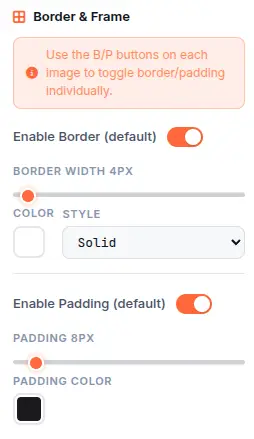
Solid or double borders with custom width and color. Inner padding with separate background color. Frame styles for rounded corners and decorative edges. Per-image toggle controls for individual customization within batch workflows.
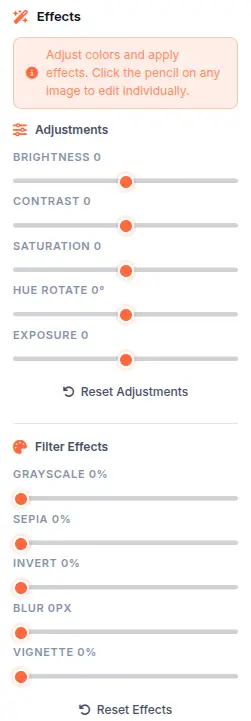
Adjustments & Filters
Brightness, contrast, saturation, hue rotate, and exposure controls from -100 to +100. Effects include grayscale, sepia, invert, blur, and vignette. Apply to all images at once or fine-tune each one individually with per-image overrides.
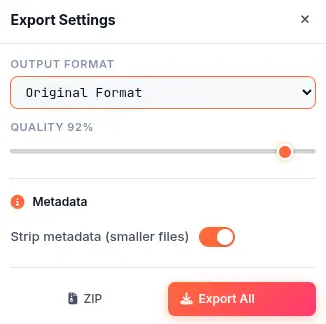
Batch Export (PNG / JPEG / WebP / ZIP)
Export as PNG (lossless), JPEG (configurable quality 0-100), or WebP (modern compression). Batch rename with patterns: {name}, {index}, {w}, {h}, {date}, {time}. Download individual files or package all processed images into a single ZIP archive with progress tracking.
See the Difference
Drag the slider to compare the original photo with the edited result. Every adjustment runs locally in your browser — zero upload, zero wait.


What Makes It Different
Not a cloud-based editor with upload queues — a fully client-side batch processor with per-image control and unlimited volume.
100% Client-Side Processing
All image processing happens in your browser using Canvas 2D and OffscreenCanvas. No image data is ever sent to any server. This means faster processing for large batches, complete privacy for sensitive images, and no dependency on external APIs or processing queues.
Unlimited Batch Size
There is no limit on how many images you can process — no daily quota, no credit system, no premium tier for higher volume. Upload 10 images or 10,000. The only constraint is your device memory and processing power. Each image processes in milliseconds depending on resolution and applied edits.
Per-Image Override Controls
Global settings apply to all images by default, but you can override any setting on any individual image. Click the pencil icon on a thumbnail to open the per-image editor with live canvas preview. Adjust crop, watermark, borders, or adjustments for that specific image while keeping batch defaults for the rest.
No Account, No Upload, No Trace
No signup, no login, no data collection. The tool works entirely in your browser session. Closing the tab clears all processed data. There is no server-side storage, no analytics tracking of your images, and no third-party access to your content. The tool is designed to leave no trace.
Perfect for any workflow
From photography to e-commerce — batch edit images for any scenario with the right presets, formats, and export settings.
Photography Workflow
Batch resize and watermark entire photo shoots. Apply consistent color adjustments, add borders, and export as WebP for web delivery. Process RAW-exported JPEGs with uniform quality settings across hundreds of images.
E-Commerce Product Images
Crop to square (1:1), add white borders, resize to 1000x1000 or 2000x2000 for Amazon/Shopify/Etsy. Batch rename with product SKU patterns {name}_{index} for inventory systems. Export as JPEG at 92% quality for optimal file size.
Social Media Content
Crop one image to 18+ platform sizes simultaneously. Instagram feed (1080x1080), stories (1080x1920), Facebook cover (820x312), YouTube thumbnail (1280x720). Add branded watermarks and export at platform-optimized quality.
Professional Portfolios
Apply consistent color grading, vignette effects, and frames across portfolio images. Export high-quality PNG for client delivery or compressed WebP for web portfolios. Per-image overrides let you fine-tune individual shots while maintaining batch consistency.
Content Creation
Quickly prepare images for blog posts, newsletters, and presentations. Batch resize to 1200px width for web articles, compress to target file sizes, and rename with date-based patterns {date}_{name} for organized content libraries.
Archival & Organization
Strip metadata, standardize formats, and batch rename with dates and sequential numbers for clean file management. Convert entire image libraries to consistent formats — JPEG for photos, PNG for graphics, WebP for web archives.
Education & Documentation
Resize screenshots and diagrams for documentation, tutorials, and educational materials. Add watermarks to protect original content. Batch process lecture slides, assignment submissions, or research images with consistent formatting.
Real Estate & Architecture
Process property photos in bulk — resize for listing platforms, add branded borders, apply brightness/contrast adjustments for better presentation. Export at multiple sizes for different listing sites simultaneously.
Four steps to edited perfection
From raw images to polished exports in under a minute.
Upload Your Images
Drag and drop images onto the canvas, paste from clipboard, or click Browse. Supports JPEG, PNG, WebP, GIF, BMP, AVIF, SVG, TIFF. Upload one image or hundreds — there is no limit on file count. The gallery view shows all uploaded images with their current processing status.
Choose Your Edits
Use the sidebar to crop, resize, rotate, watermark, add borders, adjust colors, or apply effects. Select from 18 social media presets or 10 aspect ratios. All changes preview instantly on the canvas. Global settings apply to all images by default.
Fine-Tune Per Image
Click the pencil icon on any image to override global settings. Adjust individual images while keeping batch defaults for the rest. Live canvas preview shows exact output. Full undo/redo history tracks every change per image.
Export & Download
Click Export All for individual files, or Download ZIP for a single archive. Choose PNG, JPEG, or WebP format with quality control. Batch rename with patterns: {name}, {index}, {w}, {h}, {date}, {time}. Export progress tracker shows current/total count.
Frequently Asked Questions
Answers to common questions about batch processing, export formats, and privacy.
Is Image Editor really free?
Yes. There are no hidden costs, no signup requirement, no daily limits, and no watermark on exports. Every feature — batch processing, 18 presets, watermarks, adjustments, effects, per-image overrides, ZIP export — is available at no charge with no premium tiers.
Are my images uploaded to a server?
No. Every image is processed entirely in your browser using Canvas 2D and OffscreenCanvas. No image data, metadata, or file content is ever sent to any server. Closing the tab clears all local data. The tool is designed for complete privacy.
Is there a limit on how many images I can process?
No. There is no daily quota, no credit system, and no cap on total images. Upload and process as many images as you need. The only constraints are your device processing power and memory. Each image processes in milliseconds depending on resolution and applied edits.
What image formats are supported?
Image Editor accepts JPG, PNG, WebP, GIF, BMP, AVIF, SVG, and TIFF as input formats. Export is available as PNG (lossless), JPEG (configurable quality 0-100), or WebP (modern compression). PNG is recommended for graphics; JPEG for photos; WebP for web delivery.
How does batch processing work?
When you apply a global edit (crop, resize, watermark, etc.), it is stored as a parameter set. On export, each image is processed sequentially using an OffscreenCanvas — a dedicated rendering context that runs off the main thread for smooth UI. Per-image overrides are merged with global settings before processing.
Can I override settings for individual images?
Yes. Click the pencil icon on any image thumbnail to open the per-image editor. You can override crop position, watermark placement, border settings, adjustments, and effects for that specific image while keeping batch defaults for the rest. Live canvas preview shows the exact output.
What are batch rename patterns?
Batch rename supports placeholders: {name} (original filename), {index} (sequential number), {w} and {h} (output dimensions), {date} (YYYY-MM-DD), and {time} (HH-MM-SS). Example: "{name}_{w}x{h}" produces "photo_1080x1080.jpg". Patterns work with both individual downloads and ZIP exports.
Does this work on mobile?
Image Editor works on modern mobile browsers, but batch processing large numbers of images is best on desktop. Mobile browsers may have memory limits that affect performance with hundreds of images. The responsive design adapts the UI for tablet and phone screens.
Can I use processed images commercially?
Yes. Images processed with Image Editor are yours to use for any purpose — personal or commercial. No attribution is required. Use them for e-commerce, marketing, social media, print products, or any other commercial application.
How does smart crop work?
Smart crop uses edge detection to automatically position the crop rectangle on the most visually important area of each image. Instead of center-cropping, it analyzes the image content to find the focal point — typically faces, products, or main subjects. This ensures consistent framing across images with different compositions.
Ready to Edit?
Batch process unlimited images in seconds. 18 presets, per-image overrides, ZIP export — all in your browser.