
Animated Frames
Like a Pro.
56 photorealistic 3D animated frames with PBR lighting. Custom colors, texture overlays, and export as transparent PNG, WebM, or MP4 video — all rendered in your browser with WebGL. No signup, no upload, no watermark.
Free forever. No signup required. Works in your browser.
What Are Animated Frames?
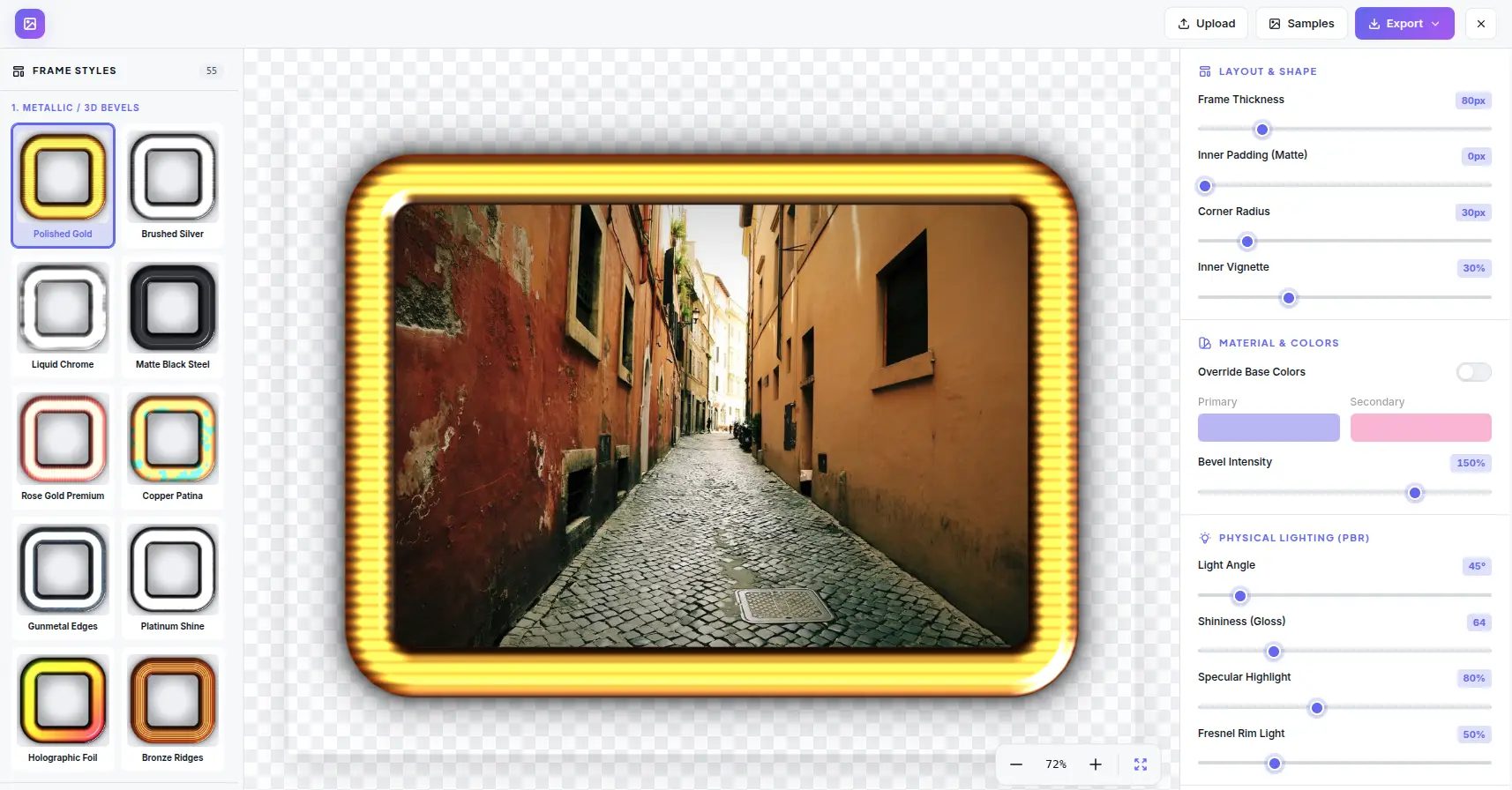
Animated frames are dynamic borders that move, shimmer, pulse, or glow in real time. Unlike static frames, animated frames use GPU-accelerated shaders to create motion effects — rotating metallic highlights, pulsing neon glow, shimmering glass reflections, and flowing organic textures. These animations run at 60fps in the browser and can be exported as transparent WebM or MP4 video files for use in video editors, social media, and presentations.
PBR Materials
Physically based rendering (PBR) simulates how real-world materials interact with light. Metallic surfaces reflect with color tinting — gold reflects warm tones, silver reflects neutral. Dielectric surfaces (glass, plastic) reflect white highlights. The shininess parameter controls highlight size; specular controls intensity; fresnel creates edge glow at grazing angles.
Animation System
The animation system uses time-based shader uniforms to drive frame effects. Metallic highlights rotate around the frame perimeter at adjustable speed. Neon frames pulse with sine-wave intensity. Glass frames shimmer with refraction shifts. Each preset includes pre-configured animation parameters — speed, intensity, direction — that can be customized in the editor.
Frame Categories
The 56 presets are organized into 6 categories that cover the most popular frame styles. Metallic frames include gold, silver, bronze, and brushed aluminum with rotating highlights. Glass frames offer frosted, clear, and tinted options with shimmer effects. Neon frames pulse with customizable colors. Organic frames feature flowing wood grain and bamboo textures.
Video Export
Export animated frames as transparent WebM video (VP9 + alpha channel) or MP4 video (H.264). The video export captures the full animation loop with configurable duration and frame rate. Transparent video preserves the alpha channel for compositing over other content in video editors like Premiere, DaVinci Resolve, or After Effects.
How Animated Frames Work
From material properties to animated output — the GPU-accelerated pipeline that creates photorealistic animated frames.
Material Setup
Each frame preset defines metallic/dielectric properties, roughness, base color, and animation parameters — speed, intensity, direction for the motion effect.
Animation Loop
The shader receives a time uniform that updates every frame. Time drives rotation, pulsing, shimmering, and flow effects based on the preset's animation parameters.
Light & Shadow
PBR lighting calculates specular, diffuse, and fresnel contributions. Shadow mapping adds depth. Both update in real time as animation progresses.
Export
Render frames to canvas, encode as transparent WebM (VP9+alpha) or MP4 (H.264), or capture still as PNG with alpha channel.
Animation Parameters
Each animated frame preset exposes parameters that control the motion effect. These parameters can be adjusted in the editor to customize the animation speed, intensity, and direction.
Everything You Need for Animated Frames
Every preset, animation control, and export option you need — all rendered in your browser with WebGL.
56 Animated Frame Presets
Photorealistic 3D animated frames across 6 categories — Metallic, Glass, Neon, Organic, Tech, and Art. Each preset features animated elements like rotating metallic highlights, pulsing neon glow, shimmering glass reflections, and flowing organic textures. The animation runs at 60fps in real time using WebGL shaders.
PBR Lighting System
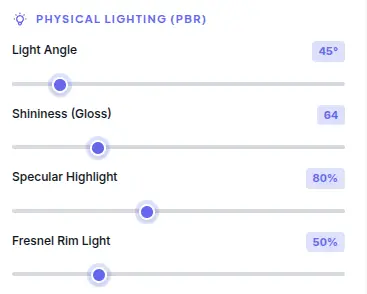
Physically based rendering with adjustable light angle (0-360°), shininess (0-100), specular intensity (0-100), and fresnel rim light (0-100). The PBR model simulates real-world material interaction with light — metallic surfaces reflect with color tinting, dielectric surfaces reflect white highlights, and fresnel creates edge glow effects.
Custom Colors & Materials
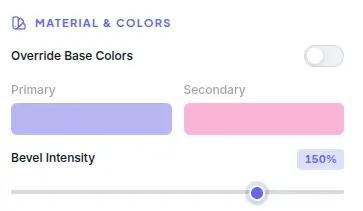
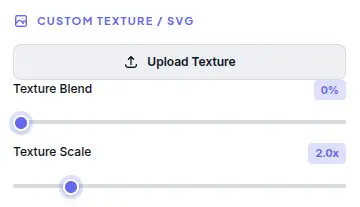
Override frame colors with primary and secondary color pickers. Adjust bevel intensity for 3D depth. Upload custom textures or SVGs for unique frame materials — wood grain, marble, fabric, or any pattern. Texture blend mode and scale controls let you fine-tune the material appearance.
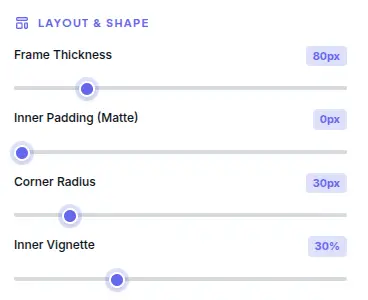
Layout & Shape Control
Adjustable frame thickness (10-200px), inner padding (0-100px), corner radius (0-50px), and outer shadow with blur, color, and offset. Layout shapes include rectangle, rounded rectangle, circle, and custom aspect ratios. Each parameter updates the frame preview in real time.
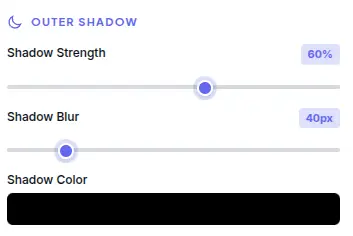
Shadow & Depth Effects
Outer shadow with adjustable blur (0-100px), color, and X/Y offset creates realistic depth. Shadow direction follows the PBR light angle for consistent lighting. Combined with PBR specular and fresnel, the frame produces photorealistic 3D appearance without complex 3D modeling.
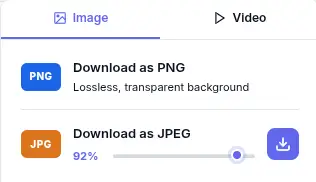
Export as PNG, WebM, or MP4
Download your framed image as transparent PNG with alpha channel, or export animated frames as transparent WebM video (VP9 + alpha) or MP4 video (H.264). Video export captures the full animation loop with audio-reactive timing. All formats preserve PBR lighting, textures, and shadow effects at maximum quality.
What Makes It Different
Not a static frame overlay — a GPU-accelerated animated frame studio with real-time WebGL animation and video export.
WebGL PBR Rendering
All frames are rendered in real time using WebGL with physically based rendering shaders. The PBR model calculates light interaction with materials based on metallic/dielectric properties, roughness, and fresnel effects. This produces photorealistic results that match real-world frame materials — gold reflects with warm tinting, glass refracts with subtle distortion, neon emits colored glow.
Real-Time Preview
Every parameter change — lighting, colors, thickness, shadow — updates the frame preview instantly on the GPU. No processing queues, no server upload, no waiting. The canvas renders at 60fps while you adjust controls, so you see exactly how the frame looks before exporting.
56 Unique Presets
Each of the 56 presets is a carefully tuned combination of material properties, textures, and default parameters. The 6 categories cover the most popular frame styles — Metallic (gold, silver, bronze), Glass (frosted, clear, tinted), Neon (glowing colors), Organic (wood, bamboo), Tech (carbon fiber, brushed metal), and Art (abstract, decorative).
No Account, No Upload, No Trace
No signup, no login, no data collection. The tool works entirely in your browser session. Closing the tab clears all processed data. There is no server-side storage, no analytics tracking of your images, and no third-party access to your content.
Perfect for any project
From video intros to social media — animated frames for any scenario with the right export format.
Photography Portfolios
Add professional frames to portrait, landscape, and product photos for portfolio presentations. The metallic and glass frames create elegant gallery-style displays. Export at full resolution for print quality or web-optimized sizes for online portfolios.
Social Media Content
Frame photos for Instagram, Facebook, Twitter/X, and LinkedIn posts. Neon frames create eye-catching visuals that stand out in feeds. Use the 1:1 aspect ratio for Instagram feed or 9:16 for stories. Export as PNG for maximum quality on social platforms.
E-Commerce Product Photos
Add professional frames to product images for catalogs, listings, and promotional materials. Metallic frames (gold, silver) create premium product presentations. Adjust thickness and padding to match brand guidelines. Export at the exact dimensions each platform requires.
Digital Art & Illustration
Frame digital artwork, illustrations, and graphic designs for gallery displays and client presentations. The Art category frames include decorative and abstract styles that complement creative work. Custom texture upload lets you match any artistic style.
Education & Documentation
Frame diagrams, screenshots, and reference images for educational materials, tutorials, and documentation. Clean frames with consistent styling create professional-looking documents. Shadow effects add depth that separates framed content from background.
Real Estate & Architecture
Frame property photos, interior shots, and architectural renders for listings and presentations. Wood and organic frames complement natural materials. Adjust shadow and lighting to match the mood of each property — warm lighting for cozy interiors, bright lighting for modern spaces.
Marketing & Advertising
Create framed visuals for banners, posters, email headers, and social media ads. Neon frames grab attention in digital advertising. Custom colors let you match brand palettes. Export at any resolution for print or digital campaigns.
Game & App UI Design
Frame character portraits, item icons, and UI elements for game assets and app interfaces. Tech and carbon fiber frames suit sci-fi and modern aesthetics. The real-time preview lets you iterate quickly on visual design decisions.
Four steps to the perfect frame
From uploaded photo to beautifully framed export in under a minute.
Upload Your Photo
Drop your own image onto the canvas, paste from clipboard, or choose from our curated samples. Supports JPEG, PNG, WebP, GIF, and BMP. The image loads at full resolution with the canvas sized to fit your screen. The default animated frame is applied immediately for instant preview.
Pick an Animated Frame
Browse 56 animated presets across 6 categories — Metallic, Glass, Neon, Organic, Tech, and Art. Click any preset to apply it instantly. Each preset loads with optimized default parameters and animation settings for that material type.
Fine-Tune the Look
Adjust PBR lighting (angle, shininess, specular, fresnel), custom colors (primary, secondary, bevel), texture overlay (upload, blend, scale), shadow (blur, color, offset), and animation (speed, intensity, direction). Every parameter updates the frame preview in real time on the GPU.
Export & Share
Download your framed image as transparent PNG, or export animated frames as transparent WebM video (VP9 + alpha) or MP4 video (H.264). Configure duration, frame rate, and quality. Share the file directly or import into video editors.
Frequently Asked Questions
Answers to common questions about PBR rendering, frame presets, and export formats.
Is Frame Generator really free?
Yes. There are no hidden costs, no signup requirement, and no watermark on exports. All 56 animated frame presets, PBR lighting, custom colors, texture overlays, and video export are available at no charge with no premium tiers.
Are my images uploaded to a server?
No. Every image is processed entirely in your browser using WebGL shaders. No image data, metadata, or file content is ever sent to any server. Closing the tab clears all local data.
What export formats are available?
Frame Generator supports three export formats: transparent PNG (lossless, alpha channel), transparent WebM video (VP9 + alpha, supports transparency), and MP4 video (H.264, broad compatibility). Video exports capture the full animation loop with configurable duration and frame rate.
How does PBR lighting work?
Physically based rendering simulates how light interacts with materials. Metallic surfaces reflect with color tinting (gold reflects warm tones, silver reflects neutral). Dielectric surfaces (glass, plastic) reflect white highlights. Fresnel creates edge glow by increasing reflectativity at grazing angles. The light angle, shininess, specular, and fresnel parameters control these effects.
What are the 6 frame categories?
Metallic (gold, silver, bronze, brushed aluminum), Glass (frosted, clear, tinted, colored), Neon (glowing colors with customizable intensity), Organic (wood, bamboo, cork, natural materials), Tech (carbon fiber, brushed steel, industrial), and Art (decorative, abstract, ornamental). Each category has 8-10 presets with unique animations.
What is the animation system?
The animation system uses time-based shader uniforms to drive frame effects. Metallic highlights rotate around the frame perimeter. Neon frames pulse with sine-wave intensity. Glass frames shimmer with refraction shifts. Organic frames flow with texture displacement. Each preset includes pre-configured speed, intensity, and direction parameters.
How do I export as transparent video?
Click Export and select WebM (VP9 + alpha) for transparent video. The export captures the full animation loop with your configured duration and frame rate. The alpha channel preserves transparency for compositing over other content in video editors like Premiere Pro, DaVinci Resolve, or After Effects.
Can I use animated frames commercially?
Yes. Frames created with Frame Generator are yours to use for any purpose — personal or commercial. No attribution is required. Use them for video production, social media, marketing, presentations, or any other commercial application.
What is the maximum export resolution?
Export captures the full canvas at the original image resolution. There is no artificial limit on export size. High-resolution images (4000px+) export at their full dimensions. PNG preserves all details; video formats maintain quality with configurable bitrate.
Does this work on mobile?
Frame Generator works on modern mobile browsers with WebGL support. The responsive design adapts the UI for tablet and phone screens. Desktop browsers provide the best experience with mouse-based zoom, pan, and parameter control. Mobile browsers support touch gestures for zoom and pan.
Ready to Animate?
Upload a photo and add stunning animated frames in seconds. 56 presets, PBR lighting, WebM/MP4 export — all in your browser.
Try more free tools
QR Code Studio
Professional QR code generator with 30+ content types
Photo Collage Maker
Professional collage maker with 50+ templates
Background Generator
Audio-reactive animated background studio
Background Remover
AI-powered bulk background removal