
Build Animated Backgrounds
That React to Audio
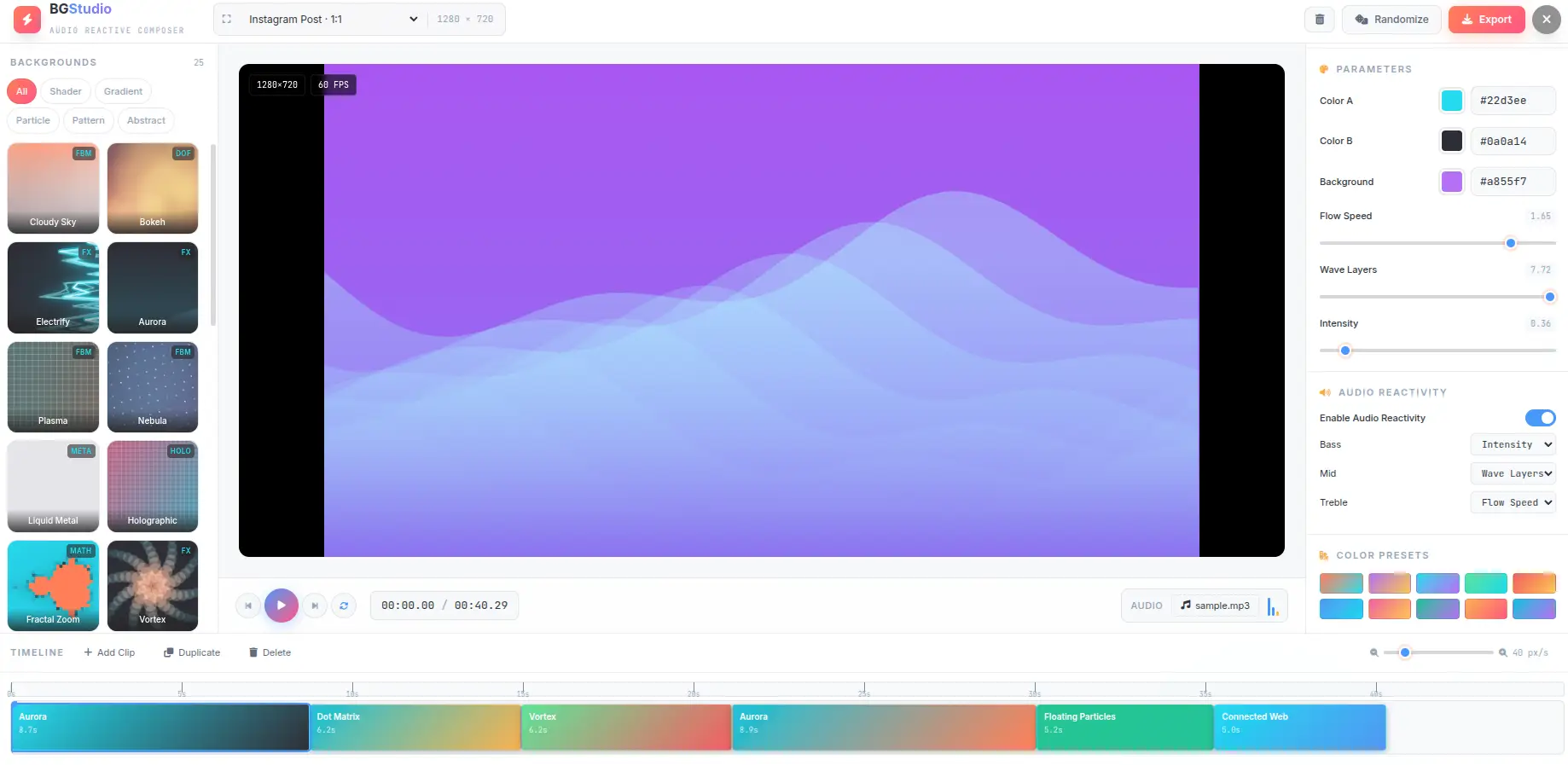
A background composer that runs entirely in your browser. Upload an audio file, map bass, mid, and treble to animation parameters, arrange clips on a timeline, and export as MP4, WebM, PNG, or JPG. No signup, no uploads, no watermarks.
Free forever. No signup required. Works in your browser.
What Are Animated Backgrounds?
An animated background is a looping visual composition rendered in real time — typically as a video loop, GIF, or live WebGL animation. Unlike static images, animated backgrounds use motion, color shifts, and particle effects to create visual depth. They are used in video production, live streaming, presentations, social media, and web design.
Shader Backgrounds
Fragment shaders run on the GPU to generate complex visual effects — plasma waves, aurora borealis, nebulae, liquid metal, holographic shifts, and fractal zooms. Each shader is a mathematical function that computes pixel colors based on time and parameters, producing infinitely smooth animation at 60fps without pre-rendered frames.
Particle & Pattern Backgrounds
Particle systems simulate hundreds or thousands of individual elements — dots, lines, stars — each with independent position, velocity, and lifecycle. Pattern backgrounds generate repeating geometric structures like grids, hexagons, wave lines, and dot matrices. Both types run on Canvas 2D with optimized rendering loops for smooth performance.
Audio Reactivity
Audio-reactive backgrounds analyze the frequency spectrum of an audio track in real time using Web Audio API FFT analysis. The spectrum is split into bass, mid, and treble bands, each normalized to [0,1]. These values modulate animation parameters — for example, bass might control particle density, mid might control rotation speed, and treble might control color intensity.
Looping & Timeline
Most animated backgrounds are designed to loop seamlessly — the end state matches the start state, creating a continuous cycle. A timeline composer arranges multiple backgrounds into a sequence, allowing transitions between different styles. Each clip on the timeline has independent parameters and audio mapping, so the visual evolves over the course of the composition.
How Audio Reactivity Works
From audio file to parameter modulation — the real-time pipeline that makes backgrounds dance to music.
Load Audio
Upload an MP3, WAV, OGG, or AAC file. The Web Audio API decodes it into a PCM buffer locally — no server upload.
FFT Analysis
AnalyserNode splits the frequency spectrum into 128 bins. Bins are grouped into bass (0-10%), mid (10-40%), and treble (40-100%).
Band Mapping
Each band is normalized to [0,1] and smoothed over time. The audio map assigns bass, mid, or treble to specific parameters.
Modulation
Mapped parameters are modulated by up to 40% of their range. The effective value = base + audio * (max - min) * 0.4.
Default Audio Maps
Each background ships with a default audio map that maps frequency bands to the most visually impactful parameters. For example, Cloudy Sky maps bass to density, mid to speed, and treble to scale. Starfield maps bass to warp, mid to count, and treble to speed. You can override these defaults per clip — any parameter with a defined range can be audio-mapped.
Everything You Need
Every feature you need to compose, customize, and export animated backgrounds — without leaving your browser.
25+ Animated Backgrounds
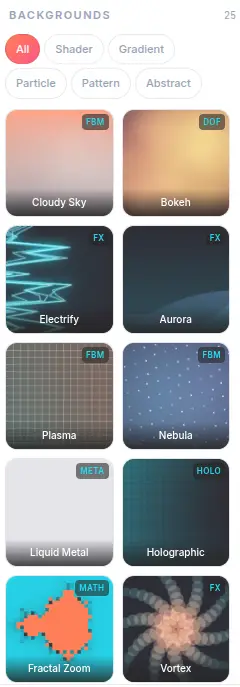
Shader, gradient, particle, pattern, and abstract backgrounds — each with unique parameters. Categories include Cloudy Sky, Aurora, Plasma, Nebula, Starfield, Fluid Flow, Kaleidoscope, and more. Every background is rendered in real time using GPU-accelerated shaders.
Audio Reactivity
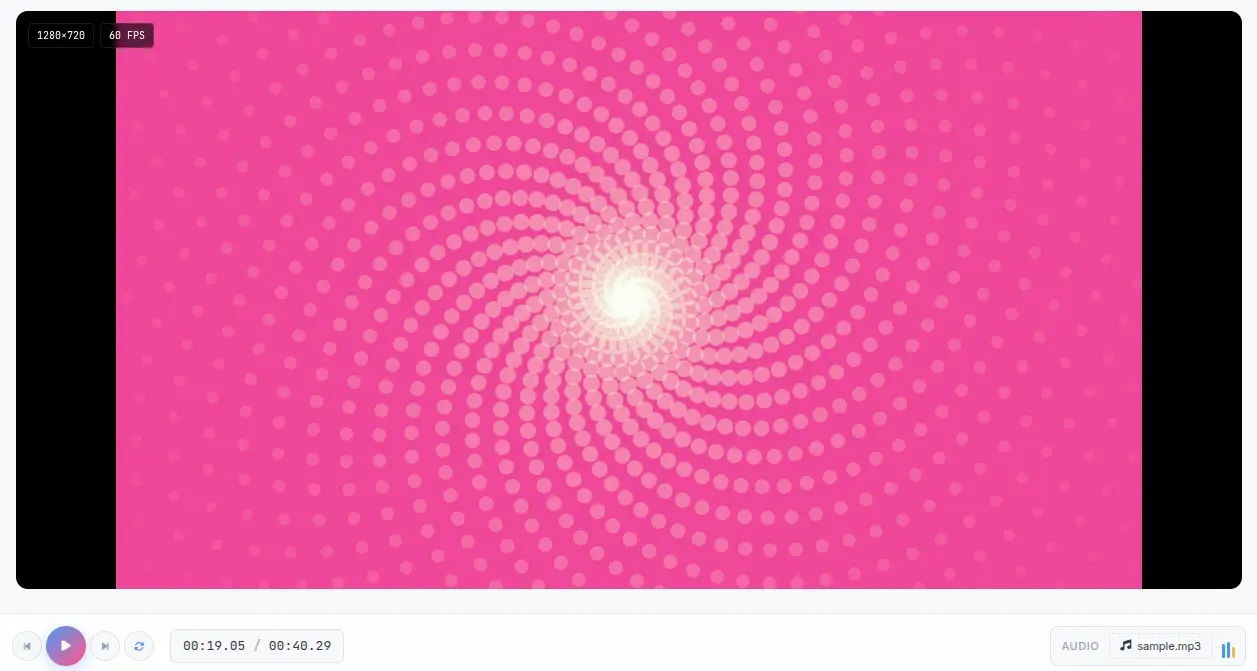
Upload any audio file — MP3, WAV, OGG, AAC — and the background reacts to bass, mid, and treble frequencies in real time. Each frequency band can be mapped to different parameters: bass controls intensity, mid controls speed, treble controls scale. A simulated beat mode works without any audio file for previewing.

Timeline Composer
Arrange multiple background clips on a timeline. Drag to reorder, resize clips by dragging edges, and fine-tune start/end times. Each clip can have different backgrounds, parameters, and audio mappings. The timeline supports zoom for precise editing at any scale.
Full Parameter Control
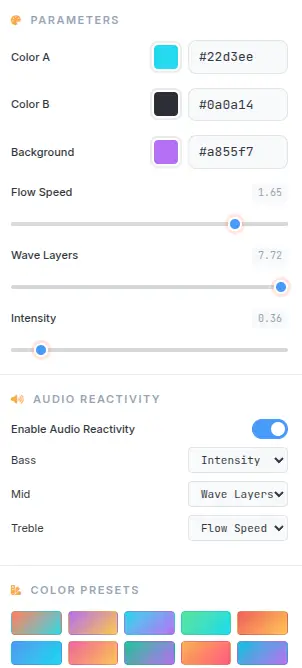
Every background exposes 4-8 adjustable parameters — speed, scale, intensity, density, blur, and more. Each parameter has a defined min/max range with live preview. 10 built-in color presets provide quick starting points, or pick custom colors for each of the 3-4 color slots per background.
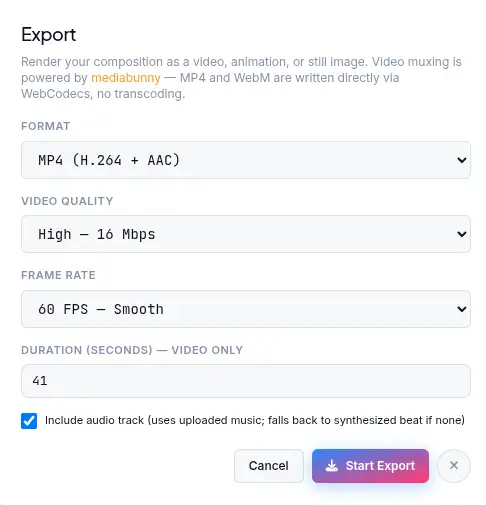
Video Export (MP4 / WebM)
Render timeline compositions as MP4 or WebM video files with audio included. Export uses WebCodecs for hardware-accelerated encoding — no server upload, no processing queue. Output resolution supports 720p and 1080p. Video files are ready for social media, presentations, or streaming overlays.
Still Image Export (PNG / JPG)
Capture any frame from the timeline as a high-resolution PNG or JPG image. Useful for thumbnails, wallpapers, static backgrounds, or preview frames. PNG provides lossless quality; JPG offers smaller file sizes for web use.
What Makes It Different
Not a template-based animation tool — a real-time audio-reactive background studio with GPU rendering.
Real-Time Audio Analysis
The audio system splits the frequency spectrum into three bands — bass (0-10%), mid (10-40%), and treble (40-100%) — using Web Audio API FFT analysis. Each band is normalized to [0,1] and smoothed over time for stable modulation. Audio data maps to parameters with up to 40% range modulation, so the background responds naturally without extreme jumps.
GPU-Accelerated Rendering
Shader backgrounds run on the GPU via WebGL fragment shaders. Particle and pattern backgrounds use Canvas 2D with optimized rendering loops. The entire pipeline runs at 60fps in the browser — no server-side rendering, no processing delays, no export queues.
Multi-Clip Timeline
Each clip on the timeline has its own background, parameter values, and audio mapping. Clips can be duplicated, reordered, and resized independently. The timeline zoom (10-200 px/s) provides frame-level precision for aligning clips to audio beats or specific timestamps.
No Upload, No Signup
All rendering happens in your browser. Audio files are decoded locally via Web Audio API and never sent to any server. Video encoding uses WebCodecs on the client side. There is no account to create, no data retained, and no processing on remote infrastructure.
Perfect for any project
From video intros to live streaming overlays — generate animated backgrounds for any use case with the right format and settings.
Video Intros & Outros
Create animated background loops for YouTube intros, podcast openers, or Twitch stream overlays. Export as MP4 with audio and import directly into your video editor. The audio-reactive mode ensures the animation matches the rhythm of your soundtrack.
Live Streaming Overlays
Use WebGL shader backgrounds as real-time overlays for OBS, Streamlabs, or vMix. The GPU-accelerated rendering maintains 60fps performance without impacting stream quality. Export transparent PNG sequences or direct video loops.
Presentations & Slides
Replace static slide backgrounds with subtle animated gradients or particle effects. Export as MP4 video loops or capture still frames as PNG for Google Slides, Keynote, or PowerPoint. Animated backgrounds add visual interest without distracting from content.
Social Media Content
Generate eye-catching animated backgrounds for Instagram Reels, TikTok, or Twitter/X posts. The 9:16 and 1:1 aspect ratio presets match platform requirements. Audio-reactive backgrounds paired with music create engaging short-form content.
Game & App Backgrounds
Create looping animated backgrounds for game menus, loading screens, or app interfaces. The shader-based backgrounds (Plasma, Nebula, Fractal Zoom) produce visually rich animations that loop seamlessly. Export as video or capture frames for sprite sheets.
Motion Graphics & VJ Loops
Build VJ loops for live visuals, projection mapping, or art installations. The timeline composer lets you arrange multiple backgrounds into a sequence, and audio reactivity syncs the visuals to music. Kaleidoscope, Fluid Flow, and Electrify are particularly popular for live performance visuals.
Blog & Website Headers
Replace static header images with subtle animated backgrounds. Export as MP4 for HTML5 video backgrounds or capture optimized JPG frames. Animated gradients and particle effects add visual depth to landing pages without impacting load performance.
Education & Demos
Create animated backgrounds for educational video content, coding tutorials, or software demos. The parameter controls let you demonstrate concepts like wave functions, particle systems, or shader programming in real time.
Four steps to an animated background
From audio file to exported video in under a minute.
Select a Background
Browse 25+ backgrounds across 5 categories — shader, gradient, particle, pattern, and abstract. Click any thumbnail to add it to the timeline. Each background loads instantly with default parameters.
Customize Parameters
Select a clip on the timeline, then adjust colors, speed, scale, intensity, and other parameters in the right panel. Each background exposes 4-8 parameters with defined min/max ranges. Use one of the 10 built-in color presets or pick custom colors.
Enable Audio Reactivity
Upload an audio file (MP3, WAV, OGG, AAC) or use the built-in beat simulator. Map bass, mid, and treble frequency bands to specific parameters — for example, bass to intensity, mid to speed, treble to scale. Each band modulates up to 40% of the parameter range.
Export Your Creation
Click Export and choose between video (MP4 or WebM with audio) or still image (PNG or JPG). Video export uses WebCodecs for hardware-accelerated encoding at 720p or 1080p. Still frames capture the exact current frame at full resolution.
Frequently Asked Questions
Answers to common questions about audio reactivity, export formats, and rendering.
Is Background Generator really free?
Yes. There are no hidden costs, no signup requirement, and no watermark on exports. All rendering happens in your browser — every feature is available at no charge, with no premium tiers or paywalls.
Are my audio files uploaded to a server?
No. Audio files are decoded locally in your browser using the Web Audio API. They are never sent to any server. The entire audio analysis pipeline — FFT processing, frequency band extraction, and parameter modulation — runs client-side.
What audio formats are supported?
Background Generator supports MP3, WAV, OGG, AAC, and any other format that the browser's Web Audio API can decode. In practice, this covers virtually all common audio formats. The audio file is decoded into a PCM buffer for analysis.
How does audio reactivity work?
The audio system uses Web Audio API's AnalyserNode with FFT size 256 (128 frequency bins). The spectrum is split into three bands: bass (bins 0-10%), mid (bins 10-40%), and treble (bins 40-100%). Each band's average amplitude is normalized to [0,1] and smoothed over time. The normalized values modulate mapped parameters by up to 40% of their full range.
What video formats can I export?
Background Generator supports MP4 (H.264) and WebM (VP8/VP9) video export with audio. Both formats are rendered entirely in the browser using the WebCodecs API for hardware-accelerated encoding. MP4 is broadly compatible; WebM is open-source and well-supported in browsers and most video editors.
What image formats can I export?
Still frames can be captured as PNG (lossless, larger file) or JPG (compressed, smaller file) at the canvas resolution. PNG is recommended for maximum quality; JPG is sufficient for web use, thumbnails, and social media. Output resolution supports up to 1080p.
Can I use these backgrounds commercially?
Yes. Backgrounds generated with Background Generator are yours to use for any purpose — personal or commercial. No attribution is required. Use them for video production, social media, presentations, live streams, or any other commercial application.
How do I add audio reactivity to a background?
Select a clip on the timeline, then open the Audio section in the right panel. Toggle "Audio Reactive" on, upload an audio file or enable the beat simulator, and configure the audio map. The audio map specifies which frequency band (bass, mid, treble) controls which parameter. Each background has sensible defaults — bass typically controls intensity, mid controls speed, treble controls scale.
What is the maximum export resolution?
Video export supports 720p (1280x720) and 1080p (1920x1080) resolution. Still frame export captures at the current canvas resolution, which defaults to 1280x720. The canvas size can be adjusted in the editor settings before exporting.
How many clips can I add to the timeline?
There is no hard limit on the number of clips. Each clip can be 1-30 seconds long, and clips are arranged sequentially on the timeline. The total composition length is determined by the end time of the last clip. Practical limits depend on browser memory, but compositions with dozens of clips run without issues.
Do I need to create an account?
No. Background Generator works entirely in your browser with no account, no signup, and no data stored on any server. Open the tool, create your background, and export — the entire workflow is anonymous and private.
Ready to Create?
Build audio-reactive animated backgrounds in seconds. 25+ backgrounds, timeline composer, MP4/WebM/PNG/JPG export.
Try more free tools
QR Code Studio
Professional QR code generator with 30+ content types
Photo Collage Maker
Professional collage maker with 50+ templates
Background Remover
AI-powered bulk background removal
Image Editor
Professional batch image editor with advanced tools