
Remove Backgrounds
from Unlimited Images
A background remover that runs entirely in your browser. Upload unlimited images, let WebGPU AI process them locally, refine with brush tools, and export as PNG, JPEG, or ZIP. No signup, no uploads, no watermarks, no daily limits.
Free forever. No signup required. Works in your browser.
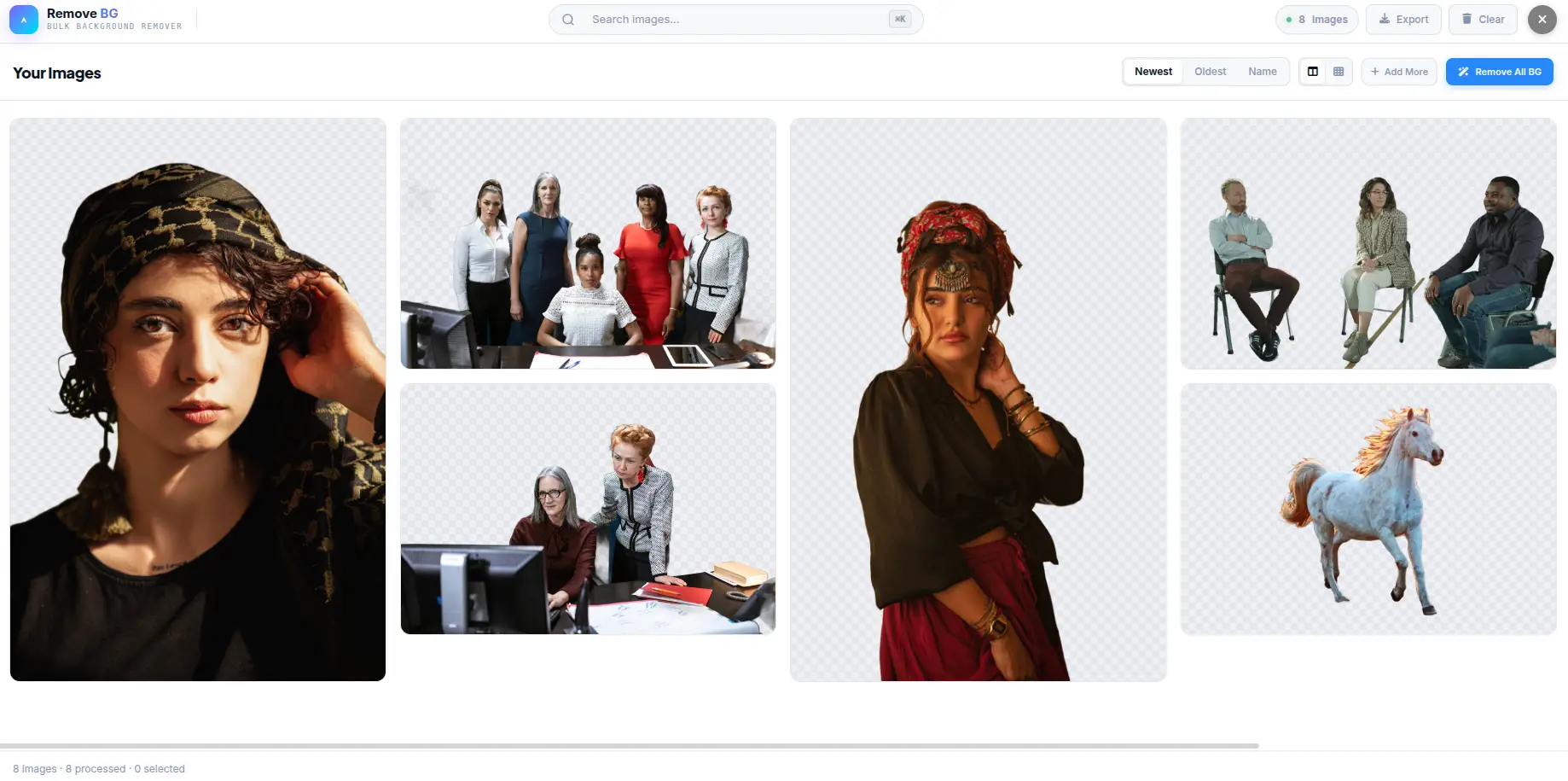
What Is Background Removal?
Background removal is the process of isolating the main subject in an image and separating it from the surrounding background. The result is a cutout image with a transparent background (alpha channel), which can be placed on any new background — solid colors, gradients, custom images, or composited into other scenes.
AI-Based Segmentation
Modern background removal uses neural networks trained on millions of images to distinguish foreground subjects from backgrounds. The model analyzes color, edges, texture, and context to generate a binary mask — a black-and-white image where white represents the subject and black represents the background. This mask is then applied to the original image to produce a transparent cutout.
Alpha Channel and Transparency
The alpha channel is a fourth channel (alongside RGB) that stores transparency information for each pixel. A value of 0 means fully transparent; 255 means fully opaque. PNG format supports alpha channels, which is why PNG is the preferred export format for background-removed images. JPEG does not support transparency — it fills transparent areas with a solid color (typically white).
Refinement and Edge Detection
AI models produce good results on most images, but fine details — hair strands, transparent fabrics, fur, glass — often require manual refinement. Brush-based tools let you erase leftover background artifacts or restore accidentally removed areas. The mask-based editing system modifies the binary alpha channel directly, giving you pixel-level control over the cutout edge.
Client-Side vs. Server-Side
Traditional background removal tools send your images to a remote server for processing. This introduces latency, privacy concerns, and potential data retention. Client-side tools like Background Remover run the AI model entirely in your browser using WebGPU. Your images never leave your device — the processing happens on your local GPU, and results are available instantly without network transfer.
How AI Background Removal Works
From image upload to transparent cutout — the WebGPU-powered pipeline that runs entirely in your browser.
Load Model
The rembg-webgpu model loads from a CDN into your browser. A WebGPU availability check runs first, with a 120-second timeout and clear error messages if GPU is unavailable.
Segment
The U-Net neural network analyzes the image on your GPU via WebGPU. It identifies the foreground subject by processing color, edges, texture, and spatial context across multiple layers.
Mask
A binary mask is generated — white pixels for the subject, black for the background. The mask is applied to the original image, setting background pixels to transparent (alpha = 0).
Refine
Brush tools let you manually adjust the mask — erase artifacts, restore edges, or fine-tune hair and fur details. The result is exported as PNG with transparency or JPEG with a solid background.
Why Client-Side Matters
Server-based background removers require uploading your images to a remote server — introducing latency, bandwidth costs, and privacy risks. Your images may be logged, stored, or used for model training. Background Remover eliminates all of these concerns by running the entire pipeline on your device. The AI model is loaded once into browser memory and reused for every image. Processing happens at GPU speed (approximately 1-3 seconds per image) without any network transfer. Closing the tab clears all data.
Everything You Need
Every feature you need to remove, refine, customize, and export — all running locally in your browser.
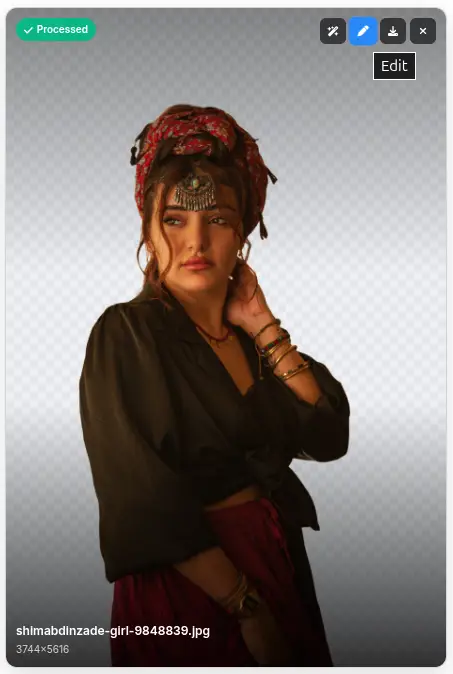
AI Background Removal
WebGPU-powered AI detects subjects and removes backgrounds automatically. The model runs entirely in your browser — no server upload, no processing queue, no data retention. Each image is processed locally using your device GPU for instant results.
Bulk Processing - Unlimited Images
Upload and process unlimited images at once — there is no cap on file count or daily usage. Drag an entire folder, select hundreds of photos, or paste images from clipboard. Each image is processed sequentially with progress tracking and status updates.
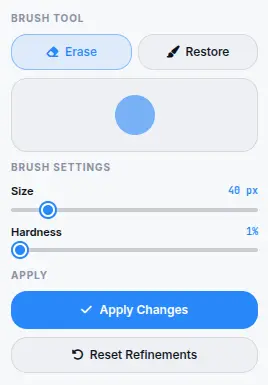
Refine with Brush Tools
Erase and restore brushes let you fix edges, remove leftover artifacts, or restore accidentally removed areas. Brush size and hardness are adjustable. Full undo/redo history tracks every stroke. The mask-based editing system works on the binary alpha channel for pixel-perfect control.
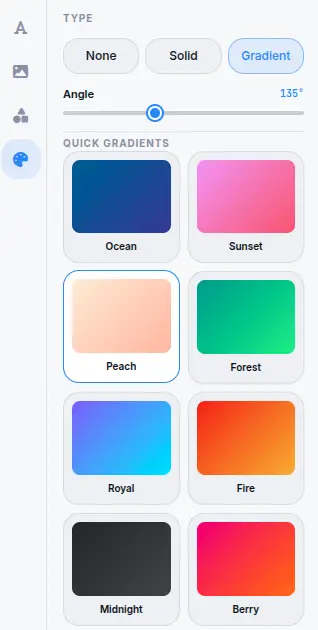
Custom Backgrounds
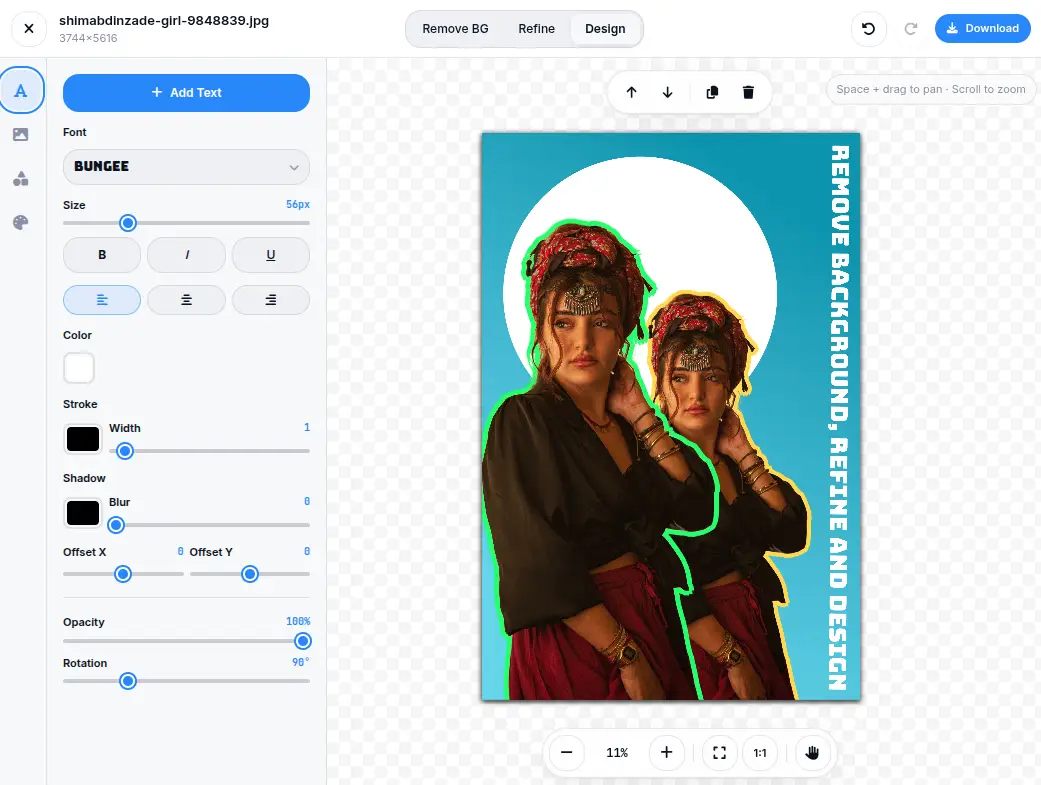
Replace removed backgrounds with solid colors, linear or radial gradients, or custom images. The gradient editor supports two-color stops with angle control. Drop shadow effects add depth to cutout subjects. Every background option works at the original image resolution.
50+ Presets
Professional background presets organized by use case — product photography, social media profiles, ID photos, creative templates, and more. Each preset applies a pre-configured background, shadow, and framing. One click to apply, then export immediately.
Batch Export (PNG / JPEG / ZIP)
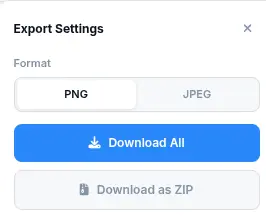
Export processed images as PNG with transparency, or JPEG with configurable quality (0-100). Download individual files or package all images into a single ZIP archive. The ZIP export tracks progress and handles any number of images without browser memory limits.
See the Difference
Drag the slider to compare the original photo with the background removed. AI-powered segmentation removes any background in seconds — all in your browser.


What Makes It Different
Not a server-based tool with daily limits — a fully client-side AI background remover with unlimited processing.
100% Client-Side Processing
The AI model (rembg-webgpu) loads from a CDN into your browser and runs on your device GPU via WebGPU. No image data is ever sent to any server. This matters for privacy-sensitive use cases — product photos before launch, personal documents, client work under NDA, or any image you do not want leaving your device.
Unlimited Images - No Daily Caps
There is no limit on how many images you can process — no daily quota, no credit system, no premium tier for higher volume. Upload 10 images or 10,000. The only constraint is your device processing power and time. Each image takes roughly 1-3 seconds depending on resolution and GPU capability.
WebGPU Acceleration
WebGPU is the modern browser graphics API that replaces WebGL for compute-heavy tasks. Background Remover uses WebGPU to run the AI model at GPU speed — significantly faster than CPU-only alternatives. A pre-flight check verifies WebGPU availability before processing begins, with clear error messages if the feature is unavailable.
No Account, No Upload, No Trace
No signup, no login, no data collection. The tool works entirely in your browser session. Closing the tab clears all processed data. There is no server-side storage, no analytics tracking of your images, and no third-party access to your content. The tool is designed to leave no trace.
Perfect for any project
From e-commerce product photos to social media profiles — remove backgrounds for any use case with the right format and settings.
E-Commerce Product Photos
Remove backgrounds from product images for Amazon, Shopify, eBay, or Etsy listings. White or transparent backgrounds are required by most marketplaces. Process entire product catalogs in bulk with consistent quality across all images.
ID Photos and Passports
Replace backgrounds with solid white, blue, or red for passport photos, ID badges, and visa applications. The 50+ presets include standard ID photo backgrounds with correct dimensions for different countries and document types.
Social Media Profiles
Create clean profile pictures and post images with custom gradient or solid backgrounds. The preset library includes social media optimized backgrounds for Instagram, LinkedIn, Facebook, and Twitter/X profile photos.
Marketing and Advertising
Extract product subjects from lifestyle photos for ad creatives, banners, and social media posts. Add branded gradient backgrounds, drop shadows, and text overlays directly in the design editor. Export at the resolution each platform requires.
Photography and Portraits
Isolate portrait subjects from busy backgrounds for headshots, team photos, or portfolio images. The refine brushes handle hair edges, transparent clothing, and other fine details that automatic removal may miss.
Graphic Design and Presentations
Extract elements from photos for use in presentations, infographics, and design compositions. The built-in design editor adds text, shapes, and additional images on top of the cutout subject with full layer control.
Education and Documentation
Clean up images for educational materials, documentation, and tutorials. Remove distracting backgrounds from screenshots, diagrams, and reference photos to create focused visual content.
Real Estate and Architecture
Isolate building exteriors, furniture, or interior elements from background clutter. Process property photos in bulk for listings, virtual staging, or architectural presentations.
Four steps to remove backgrounds
From uploaded image to transparent cutout in seconds.
Upload Images
Drag and drop images or click to browse. Supports JPG, PNG, WebP, BMP, and GIF. Upload one image or hundreds — there is no limit on file count. The gallery view shows all uploaded images with their current processing status.
AI Processing
Click "Remove All" to process every image, or select specific images and process them individually. The WebGPU AI model detects subjects, generates a binary mask, and removes the background. Each image takes 1-3 seconds depending on resolution and GPU.
Refine and Customize
Open any processed image in the editor to fine-tune edges with erase/restore brushes, replace backgrounds with solid colors or gradients, apply one of 50+ presets, or add text and shapes in the design canvas.
Export and Download
Download individual images as PNG (with transparency) or JPEG (with quality control). Or select multiple images and export them all as a ZIP archive. The export progress tracker shows current/total count during batch downloads.
Frequently Asked Questions
Answers to common questions about AI removal, WebGPU, export formats, and privacy.
Is Background Remover really free?
Yes. There are no hidden costs, no signup requirement, no daily limits, and no watermark on exports. Every feature — AI removal, bulk processing, refine brushes, presets, batch export — is available at no charge with no premium tiers.
Are my images uploaded to a server?
No. Every image is processed entirely in your browser using WebGPU-accelerated AI. The model runs on your device GPU. No image data, metadata, or file content is ever sent to any server. Closing the tab clears all local data.
Is there a limit on how many images I can process?
No. There is no daily quota, no credit system, and no cap on total images. Upload and process as many images as you need. The only constraints are your device processing power and the time it takes to process each image (approximately 1-3 seconds per image).
What image formats are supported?
Background Remover accepts JPG, PNG, WebP, BMP, and GIF as input formats. Export is available as PNG (with transparency support) or JPEG (with configurable quality from 0-100). PNG is recommended for maintaining transparent backgrounds.
How does the AI background removal work?
The tool uses the rembg-webgpu model, which is a U-Net neural network trained for binary image segmentation. It loads from a CDN into your browser, runs on your GPU via WebGPU, and produces a binary mask that separates the foreground subject from the background. The mask is applied to the original image to produce a transparent cutout.
What is WebGPU and do I need it?
WebGPU is the modern browser graphics API that enables GPU-accelerated computing. Background Remover uses WebGPU to run the AI model at GPU speed. Most modern browsers (Chrome 113+, Edge 113+, Opera 99+) support WebGPU. If WebGPU is unavailable, the tool will display a clear error message with upgrade instructions.
Can I refine the AI results?
Yes. The refine tab provides erase and restore brushes with adjustable size and hardness. Erase removes leftover background artifacts; restore brings back accidentally removed areas. Full undo/redo history tracks every brush stroke. The mask-based editing system works on the binary alpha channel for precise control.
Can I add custom backgrounds after removal?
Yes. The design tab supports solid color backgrounds, linear/radial gradients with two-color stops and angle control, custom background images, and drop shadow effects. You can also add text overlays, shapes, and additional images on top of the cutout subject with full layer control.
What export formats are available?
Export as PNG with transparency support, or JPEG with configurable quality (0-100). For bulk exports, download individual files or package all processed images into a single ZIP archive. The ZIP export tracks progress and handles any number of images.
Does this work on mobile?
Background Remover works best on desktop browsers with WebGPU support. Mobile browsers may have limited or no WebGPU support, which prevents the AI model from running. The tool includes a pre-flight check that detects WebGPU availability and displays a clear message if the feature is unavailable on the current device.
Can I use processed images commercially?
Yes. Images processed with Background Remover are yours to use for any purpose — personal or commercial. No attribution is required. Use them for e-commerce listings, marketing materials, social media, print products, or any other commercial application.
Ready to Remove Backgrounds?
Upload unlimited images, remove backgrounds with AI, and export as PNG, JPEG, or ZIP — all in your browser.
Try more free tools
QR Code Studio
Professional QR code generator with 30+ content types
Photo Collage Maker
Professional collage maker with 50+ templates
Background Generator
Audio-reactive animated background studio
Image Editor
Professional batch image editor with advanced tools