Text Effects Generator
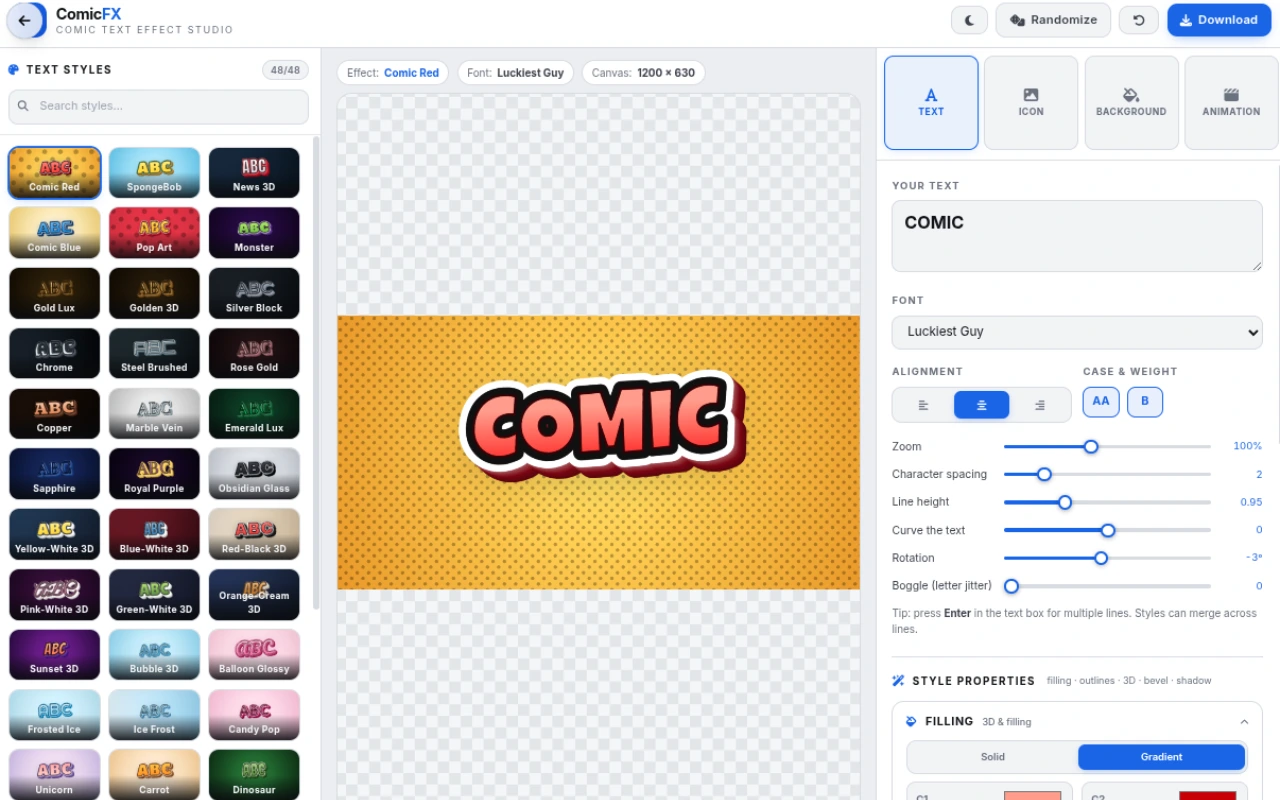
Create stunning text effects online for free. 30 ready-made styles — 3D, comic, neon, gold, chrome, fire and more — with 30+ fonts, icons, animated effects and export to PNG, JPG or transparent WebM video. No sign-up, no watermark.
Features
Everything Text Effects Generator can do.
30 ready-made styles
Start from a named preset — Comic Red, SpongeBob, Gold Lux, Chrome, Neon Sign, Burning Fire, Galaxy Space, Urban Graffiti and more — then tweak every detail.
30+ display fonts
A curated library of bold display and cartoon fonts (Luckiest Guy, Bangers, Anton, Bungee, Press Start 2P and more) with case, weight, spacing and curve controls.
Full styling control
Stack gradient fills, two outlines, a 3D extrusion, brilliant beveling and a projected shadow. Every layer has its own color, size and direction sliders.
Icons & images
Drop in an SVG icon from the built-in animated library or import your own PNG/JPG/SVG, tint it, position it behind the text and pick a blend mode.
Animated text effects
Bring the text to life with pulse, bounce, shake, swing, spin, float, blink, rainbow, pop-in and wave animations — exportable as WebM video.
Backgrounds & ratios
Solid, gradient or image backgrounds with halftone overlays, plus one-click canvas presets for thumbnails (1200×630), square, story, YouTube and cinema ratios.
Export anywhere
Download PNG or JPG, copy straight to the clipboard, export a transparent PNG, or record a WebM video — including transparent VP9 alpha video.
Light & dark themes
A clean interface in light or dark theme that runs entirely in your browser — free, private, no account, no watermark.
Built-in text effects
30 ready-to-use effects across 5 categories — every one is fully customizable.
Comic & Cartoon
Bold comic-book and cartoon looks for fun titles and thumbnails.
- Comic Red
- Comic Blue
- SpongeBob
- Pop Art
- Plastic Blocks
- Carrot
- Dinosaur
- Green Slime
3D & Glossy
Dimensional, beveled and glossy finishes that pop off the canvas.
- News 3D
- Bubble 3D
- Balloon Glossy
- Gold Lux
- Chrome
- Steel Brushed
Neon & Cyber
Glowing neon signs and futuristic cyber looks.
- Neon Pink
- Neon Sign
- Cyber Glitch
- Holographic
- Galaxy Space
Fire, Ice & Nature
Elemental textures — flames, frost, wood, marble and animal prints.
- Burning Fire
- Lava Rock
- Ice Frost
- Frosted Ice
- Wood Plank
- Marble Vein
- Leopard
- Monster
Fun & Urban
Playful and street-style effects for personality-packed designs.
- Urban Graffiti
- Love Hearts
- Watermelon
How to use
A quick walkthrough, step by step.
Type your text
Open the tool and type in the TEXT tab.
Pick a font, set the alignment, case, spacing, curve and rotation.
Pick a style
Browse the STYLES tab — comic, 3D, neon, fire, chrome and more.
Click any preset to apply it instantly, then fine-tune fills, outlines, 3D depth, bevel and shadow.
Add icons & background
Add an animated SVG icon or import your own image in the ICON tab.
Choose a solid, gradient or image background — or keep it transparent.
Animate (optional)
In the ANIMATION tab pick pulse, bounce, spin, wave and more.
Set the duration and pause between loops.
Export
Choose quality and canvas ratio — fitted, square, 16:9, 9:16 and more.
Download PNG/JPG, copy to clipboard, or record a WebM video — including transparent video.
Frequently asked questions
Everything you need to know about Text Effects Generator.
What is a text effects generator?
A text effects generator turns plain words into styled, eye-catching typography — 3D extrusions, comic outlines, neon glows, gold and chrome finishes — right in your browser. This tool ships with 30 ready-made styles you can customize down to every layer.
Is this text effect maker free?
Yes. It is completely free with no sign-up, no watermark and no usage limits. Everything runs locally in your browser, so your text and images never leave your device.
Can I use these text effects on YouTube thumbnails?
Yes. The default canvas is 1200×630 — ideal for Open Graph and thumbnails — and there are one-click ratios for square posts, stories (9:16), YouTube (16:9) and cinema (21:9). Export a high-quality PNG and drop it straight onto your thumbnail.
How do I make a 3D text effect?
Pick any preset (for example News 3D or Chrome) and open the STYLES tab. The 3D projection section controls length, angle and color of the extrusion, while the bevel section adds realistic edge lighting.
Can I animate my text?
Yes. Choose from pulse, bounce, shake, swing, spin, float, blink, rainbow, pop-in and wave animations, set the duration and pause, then export the result as a WebM video — including transparent video via VP9 alpha.
Can I add my own logo or icon?
Yes. Import any PNG, JPG or SVG image, or pick from the built-in animated SVG icon library. You can tint icons, scale and position them, place them behind the text and choose a blend mode.
What formats can I export to?
PNG, transparent PNG, JPG, direct clipboard copy, and WebM video (normal or transparent). Quality presets range from LITE to ULTRA (2× resolution).
Does the tool work offline or on mobile?
It runs entirely client-side in any modern browser, so after the page loads no server is involved. The layout is responsive and adapts to smaller screens.
Ready to try Text Effects Generator?
Open it and start creating in seconds.
More free tools
Explore the rest of the EditPhotosForFree toolkit.