Photo Collage Maker
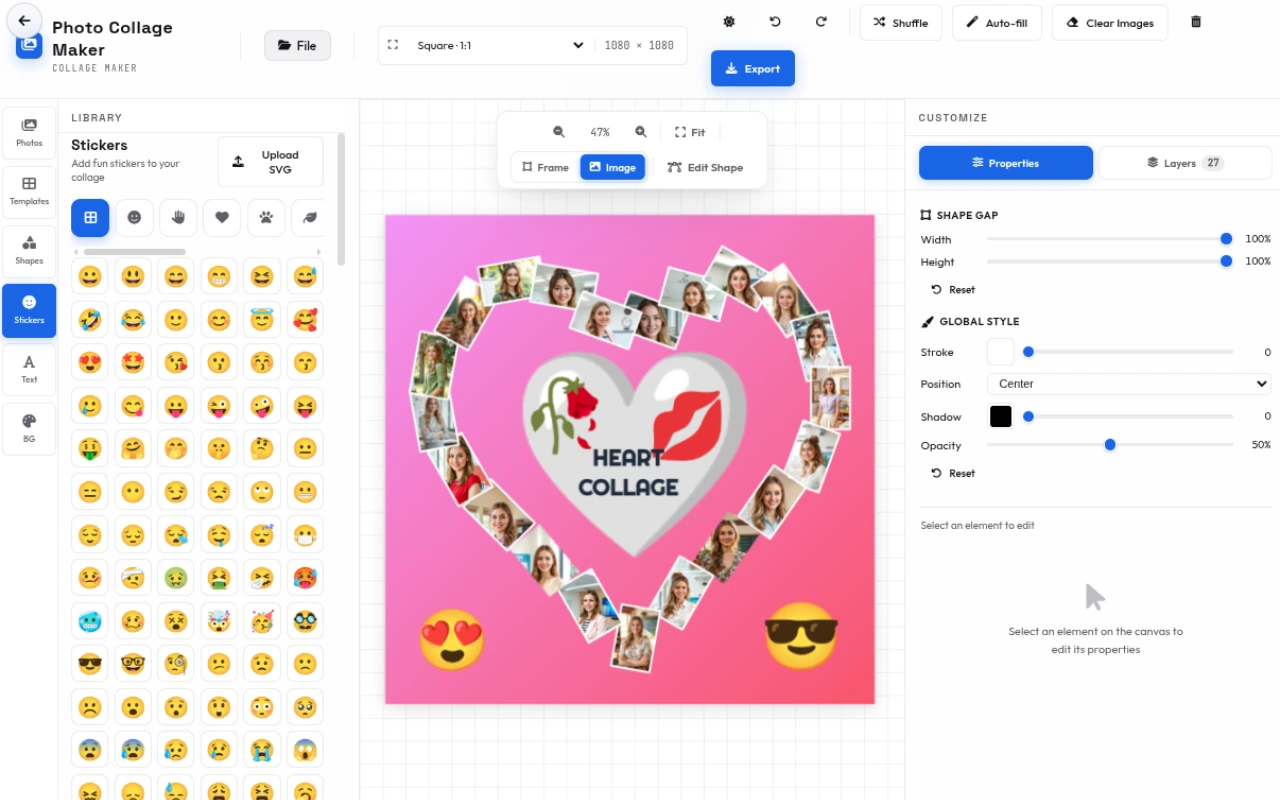
Make photo collages in your browser. 80 ready-made templates across grids, geometric, circles and hearts, plus editable shapes, stickers, text and custom backgrounds. Export a share-ready image — free, no upload, no account, no watermark.
Features
Everything Photo Collage Maker can do.
80 ready-made templates
Browse 80 templates across four categories — classic grids, geometric, circles and hearts — and apply one with a single tap.
Smart layouts
Drop photos into balanced grid and freeform layouts, or use auto-fill and shuffle to arrange them instantly.
Editable shapes
Frame photos with shapes you can reshape point by point, or add decorative shapes for a custom look.
Sticker library
Decorate your collage with a built-in library of fun stickers, or upload your own SVG.
Text layers
Add headings, subheadings, body text and captions with full control over font, color, size and position.
Custom backgrounds
Set a solid color, gradient or pattern behind your collage to match any theme.
Layers & undo
Arrange every element on a layers panel with full undo and redo, so nothing is ever lost.
One-click export
Export the finished collage as PNG or JPEG at standard, high or ultra quality — no watermark.
Collage templates
80 ready-to-use templates across 4 categories — each one is fully customizable — swap in your own photos, colors and text.
Classic Grids
Clean, balanced grids for family photos, albums and social posts.
- Mosaic 6
- 2×2
- 3×3
- Center Focus
- Corner Hero
- Filmstrip
- Hero Bottom
- Hero Left
- Hero Right
- Hero Top
- Rounded 4
- Stripes H
- Stripes V
- Wide + 2
Geometric
Angular, faceted and editorial layouts with a modern edge.
- Angles Mix
- Block Grid
- Diagonal Shards
- Grid Blocks
- Slant Bands
- Slant Columns
- Facet 1
- Facet 2
- Facet 3
- Facet 4
- Facet 5
- Facet 6
- Facet 7
- Facet 8
- Heart Mosaic 1
- Heart Mosaic 2
- Heart Mosaic 3
- Jagged Heart
- Shattered Heart
- Wavy Heart
- Center Piece
- Circle Focus
- Diagonal Patch
- Editorial Columns
- Offset Mosaic
- Patchwork Mix
Circles
Round, pie and flower layouts for a soft, playful feel.
- Circle Template 2
- Circle Template 3
- Circle Template 4
- Circle Spiral Template
- Circle Template 7
- Pie 2 Slices
- Pie 3 Slices
- Pie 4 Slices
- Pie 5 Slices
- Pie 6 Slices
- Pie 7 Slices
- Pie 8 Slices
- Pie 9 Slices
- Pie 10 Slices
- Beach Ball Collage
- Soccer Ball Collage
- Tilted Petal Bloom
- Dart Star
- Curved Blade Flower
- Pointed Petal Bloom
- Wide Wedge Flower
Hearts
Heart-shaped collages for Valentine’s Day, weddings and anniversaries.
- Heart 1
- Heart 2
- Heart 3
- Heart 4
- Heart 5
- Heart 6
- Heart Bars
- Heart Bricks
- Heart Circle X
- Heart Mosaic
- Heart of Hearts
- Heart Outline
- Heart Pixel
- Heart Quadrant
- Heart Radial
- Heart Bands
- Heart Quarters
- Heart Segments
- Heart Grid
How to use
A quick walkthrough, step by step.
Add photos
Upload the photos you want to include.
Pick a template from the library — grids, geometric, circles or hearts.
Your photos fill the frames automatically; use auto-fill or shuffle to rearrange.
Customize
Add shapes, stickers, and text.
Set a background color, gradient or pattern.
Arrange everything on the layers panel and nudge into place.
Export
Preview the collage.
Choose PNG or JPEG and a quality level.
Download your share-ready image — no watermark.
Frequently asked questions
Everything you need to know about Photo Collage Maker.
How do I make a photo collage?
Upload your photos, pick a template from the library (grids, geometric, circles or hearts), add shapes, stickers and text, set a background, then export as PNG or JPEG.
Is the collage maker free?
Yes, it is completely free and runs in your browser — your photos never leave your device, and there is no watermark or sign-up.
How many collage templates are there?
There are 80 ready-made templates across four categories: classic grids (2×2, 3×3, Mosaic 6, Filmstrip and more), geometric (Facet, Diagonal Shards, Editorial Columns), circles (Pie slices, Beach Ball, flower blooms) and hearts (Heart Mosaic, Heart of Hearts, Heart Pixel and more).
Can I use my own photos?
Yes. Upload your own photos and drop them into any template frame. You can also auto-fill the frames or shuffle the photos between them.
Can I add text and stickers?
Yes. Add headings, subheadings, body text and captions, plus a built-in library of stickers (or upload your own SVG). Everything can be resized, recolored and repositioned.
What formats can I export to?
You can export as PNG or JPEG at standard, high or ultra quality, at your chosen resolution.
Are my photos uploaded to a server?
No. Everything runs locally in your browser — your photos never leave your device, so it is fast and private.
Ready to try Photo Collage Maker?
Open it and start creating in seconds.
More free tools
Explore the rest of the EditPhotosForFree toolkit.