Image Effects Generator
Make any photo move to music. 62 audio-reactive effects across 8 categories — distort, color, glow, overlay, glitch, pattern, stylize and visualizer — with a full timeline, 14 canvas presets, live waveform and MP4/WebM/PNG export. 100% in-browser, free.
Features
Everything Image Effects Generator can do.
62 audio-reactive effects
Eight families — distort (9), color (10), glow (8), overlay (8), glitch (9), pattern (6), stylize (6) and visualizer (6) — from Pulse Zoom and RGB Shift to Spectrum Bars and Kaleidoscope.
Full timeline editor
Sequence clips on a 30s (extendable via audio) timeline with lanes, snap-to-grid, drag to move, drag edges to trim, playhead scrub, zoom (3–900px/s) and fit-to-view.
Per-effect parameters
Every effect exposes amount, speed, color, warmth, levels and more — color pickers and 0–3 sensitivity sliders update live; duplicate or delete any clip.
14 canvas presets + custom
Square 1:1 (1080), Story 9:16 (1080×1920), HD 16:9 (1280×720), QHD 2560×1440, Pin 2:3 (1000×1500), Link Preview 1.91:1 and custom 120–4096px with live fit.
Dual source studio
Drop a JPG/PNG/WebP image (cover/contain/stretch/1:1 + X/Y position 0–1) and an MP3/WAV/OGG track (volume 0–100%, bass 1.2/mid 1.4/high 1.1 sensitivity, smoothing 0–0.9).
Live transport & meters
Play/pause (Space), prev/next clip, loop, timecode 0:00.0, and bass/mid/high meters + beat LED + demo signal when no audio; waveform timeline with auto-scroll.
Magic randomize
One-click Magic builds a 6–10 clip sequence from 20 curated FX, random colors and snap-to-0.1s timing, then auto-plays — plus Clear to reset.
Pro export via Mediabunny
Export PNG/JPG still at playhead or video MP4 (H.264) / WebM (VP9/VP8) at 480–1080p, 24/30/60 FPS, bitrate 4–20 Mbps, with Full Track, Effect Length or 10s From Playhead range and optional audio (AAC/Opus).
Built-in image effects
62 ready-to-use effects across 8 categories — each one is audio-reactive with live parameters.
Distort
Warp and pulse the image with the beat.
- Pulse Zoom
- Camera Shake
- Wave Warp
- Twist
- Ripple Echo
- Vertical Stretch
- Horizontal Stretch
- Beat Bounce
- Elastic Squash
Color
Shift hue, saturation and temperature reactively.
- Hue Rotate
- Saturate Pulse
- Brightness Flash
- Contrast Punch
- Invert Strobe
- Sepia Tone
- Mono Pulse
- Color Temperature
- Duotone
- RGB Shift
Glow
Bloom, rays and aura that swell with bass.
- Neon Glow
- Soft Bloom
- Radial Rays
- Light Leak
- Pulse Aura
- Glow Ring
- Sunburst
- Halo Wash
Overlay
Cinematic overlays and vignettes.
- Vignette Pulse
- Film Grain
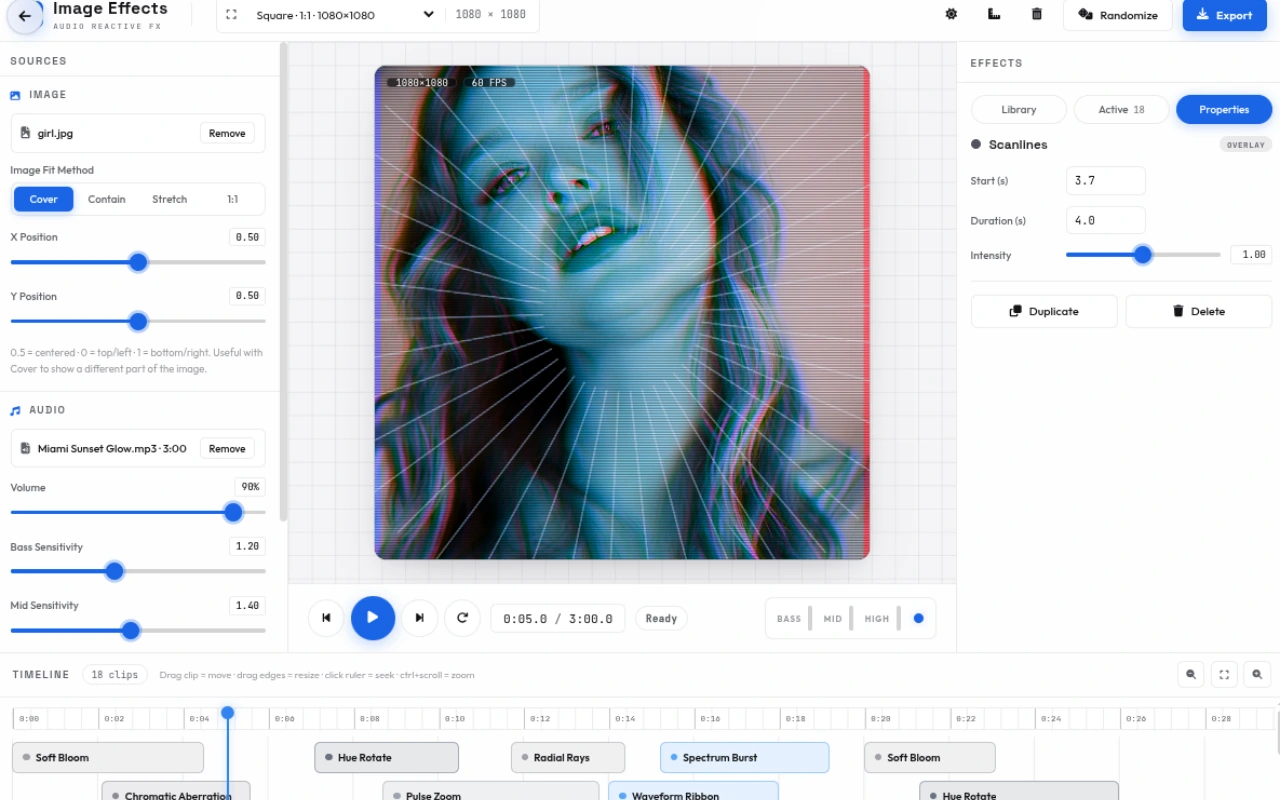
- Scanlines
- Cinematic Bars
- Border Frame
- White Flash
- Fog / Haze
- Spotlight
Glitch
Digital glitch, shift and static.
- RGB Glitch
- Slice Shift
- Block Glitch
- Signal Static
- Data Corrupt
- Chromatic Aberration
- Tape Roll
- Byte Mosh
- Jitter Cut
Pattern
Bars, waveforms and grids driven by audio.
- Spectrum Bars
- Circular Spectrum
- Waveform Line
- Particle Burst
- Floating Orbs
- Grid Pulse
Stylize
Posterize, VHS, mirror, pixelate and more.
- Posterize
- VHS Retro
- Mirror Split
- Pixelate
- Fisheye
- Kaleidoscope
Visualizer
Full-screen visualizers that dance to the spectrum.
- Circular Waveform
- Spectrum Mountain
- Mirror Bars
- LED Meter
- Waveform Ribbon
- Spectrum Burst
How to use
A quick walkthrough, step by step.
Load image & audio
Drop a JPG, PNG or WebP onto the Image zone (or click) — Cover, Contain, Stretch or 1:1 and X/Y position (0–1) to frame it.
Drop an MP3, WAV or OGG onto the Audio zone; the live spectrum (1024 bins, 20–250Hz bass, 250–2000Hz mid, 2–14kHz high) appears instantly; or keep the demo signal.
Set canvas & transport
Pick a preset — Square 1080, Story 9:16, HD 16:9, QHD, Pin 2:3, Link Preview 1.91:1 — or Custom (120–4096px).
Use Play (Space), Prev/Next clip, Loop, and timecode 0:00.0; drag the timeline ruler or playhead to scrub.
Add effects on the timeline
Search 62 effects or filter by 8 chips (Distort, Color, Glow, Overlay, Glitch, Pattern, Stylize, Visualizer).
Click any card to add it at the playhead (0.3–4s, snap 0.1s); or hit Magic for a 6–10 clip auto-sequence.
Customize each clip
Click a clip to open Properties — set start (s), duration (0.3–duration), and per-effect amount/speed/color/levels.
Duplicate or delete, and watch bass/mid/high meters and beat LED drive the preview in real time.
Edit the timeline
Drag clips to move (snap 0.1s), drag handles to trim, double-click to seek start, and zoom with Ctrl+scroll (3–900px/s) or Fit.
The timeline auto-lanes overlapping clips and keeps the playhead in view.
Export
Click Export — choose PNG/JPG still at playhead or video MP4/WebM at 480/720/1080p, 24/30/60 FPS, bitrate 4–20 Mbps.
Pick Full Track, Effect Length or From Playhead (10s), include audio (AAC/Opus), then Render & Export — file saves as fx-studio-WxH-timestamp.(mp4/webm/png/jpg).
Frequently asked questions
Everything you need to know about Image Effects Generator.
What does the image effects generator do?
It turns a still photo into an audio-reactive animation. 62 effects across 8 categories — distort, color, glow, overlay, glitch, pattern, stylize and visualizer — are driven by bass, mid and high frequencies of your track, sequenced on a timeline and exported as video or image.
How does audio reactivity work?
An Analyser (FFT 2048, smoothing 0.45) splits the spectrum into bass (20–250Hz), mid (250–2000Hz) and high (2–14kHz), each with 0–3 sensitivity and 0–0.9 smoothing. Beat detection (threshold 0.13, history 43) pulses the effects in time.
How many effects are there?
62 effects: distort (9) like Pulse Zoom and Twist, color (10) like Duotone and RGB Shift, glow (8) like Neon Glow and Sunburst, overlay (8) like Vignette and Film Grain, glitch (9) like RGB Glitch and Tape Roll, pattern (6) like Spectrum Bars, stylize (6) like Kaleidoscope, and visualizer (6) like Spectrum Mountain.
What canvas sizes are available?
14 presets — Square 1:1 (1080), Feed 1:1, Portrait 4:5 (1080×1350), Story 9:16 (1080×1920 and 720×1280), Standard/QHD 16:9 (1920×1080, 2560×1440), HD 1280×720, Post 1600×900, Card 1200×675, Link Preview 1200×630, Pin 1000×1500, LinkedIn 1200×627 — plus Custom 120–4096px.
Can I preview before exporting?
Yes. The center preview (1080×1080, fitted) shows the image with active clips (fade 0.18s envelope) at 60 FPS (tag “— FPS” live), meters for bass/mid/high and a beat LED, plus timecode and zoom controls.
What is Magic randomize?
Magic clears the timeline and builds a fresh 6–10 clip sequence from 20 curated FX with random amount (0.7–1.5), colors and snap-to-0.1s timing, then auto-plays — great for quick inspiration.
What can I export?
Still PNG/JPG at the playhead, or video MP4 (H.264) / WebM (VP9/VP8) at 480/720/1080p, 24/30/60 FPS, bitrate 4/8/12/20 Mbps, with optional audio (AAC/Opus) and range Full Track / Effect Length / From Playhead (10s).
Is it free and private?
Yes. Free, no sign-up, no watermark, and everything runs locally — your image and audio never leave the browser (offline analysis via OfflineAudioContext when needed).
Ready to try Image Effects Generator?
Open it and start creating in seconds.
More free tools
Explore the rest of the EditPhotosForFree toolkit.