Auto Caption Generator
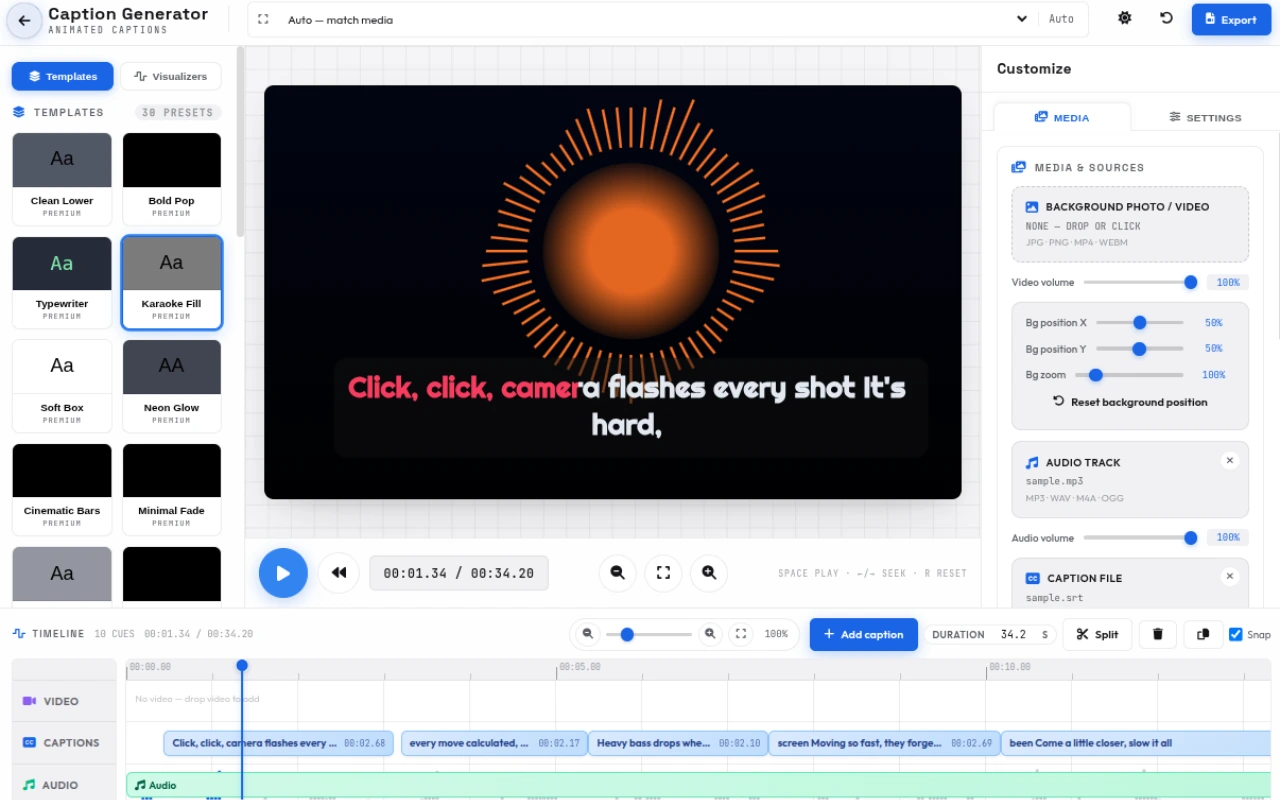
Free auto caption generator that transcribes audio or video into word-level captions right in your browser. 30 animated caption templates, 9 audio visualizer backgrounds, a pro timeline editor, and MP4/WebM export with AI subtitles. 100% private — no upload, no sign-up, no watermark.
Features
Everything Auto Caption Generator can do.
Auto transcribe (word-level)
Generate captions from audio or video with Whisper running 100% in your browser. Precise word-level timing, auto language detection, and multi-language support — no server, no upload.
30 caption templates
Start from a named template — Karaoke Fill, Bold Pop, Typewriter, Neon Glow, Luxury Gold, Cyber Glitch, Fire Ember, Retro Wave, Midnight Neon and more — then make it yours.
9 audio visualizer backgrounds
Bring the music in: bars, wave, circular burst, particles, gradient pulse, spectrum, aurora and mirrored bars react to your audio behind the captions.
Pro timeline editor
A zoomable, pannable timeline with a ruler and waveform. Drag, resize and split caption clips, scrub with the playhead, and auto-scroll keeps everything in view while playing.
Full caption controls
Control animation (fade, pop, type, slide, zoom, blur), fonts, size, weight, color, shadow, position, background, stagger and highlight active word. Sentence, word, character or karaoke display modes.
Upload any media
Drop in a background photo (JPG/PNG), video (MP4/WebM), audio track (MP3/WAV/M4A/OGG) or an existing subtitle file (SRT, VTT, TXT). Mix and match to build your captioned clip.
Light & dark themes
A clean, responsive studio in light or dark theme. The style panel becomes a drawer on small screens and the timeline adapts to touch.
Private & free
Everything runs locally on your device with WebAssembly. Your audio, video and captions never leave your browser. Free forever — no account, no watermark, no export limits.
Caption templates
30 ready-to-use caption templates across 5 categories — every one is fully customizable.
Karaoke & Word
Word-by-word and karaoke styles that light up as each word is spoken.
- Karaoke Fill
- Bold Pop
- Slide Up
- Marker Highlight
- Comic Pop
Clean & Minimal
Clean, readable sentence captions for tutorials and talking-head videos.
- Clean Lower
- Soft Box
- Minimal Fade
- Elegant Serif
- Center Stage
- Stacked Narrow
Bold & Cinematic
High-impact, cinematic and outlined styles that grab attention.
- Neon Glow
- Cinematic Bars
- Outline Heavy
- Gradient Band
- Bold Underline
Retro & Playful
Per-character animation and retro looks for a distinctive style.
- Typewriter
- Split Letters
- VHS Retro
- Chat Bubble
- Wave Rise
Themed & Textured
Signature looks with textures, glows and kinetic motion.
- Luxury Gold
- Cyber Glitch
- Handwritten
- Kinetic Bounce
- Fire Ember
- Ice Frost
- Retro Wave
- Midnight Neon
- Sunset Vibes
How to use
A quick walkthrough, step by step.
Add your source
Upload an audio track or background video, or load an existing SRT / VTT / TXT subtitle file.
No source yet? Paste a timed script directly.
Transcribe with AI
Hit "Transcribe to captions" and the in-browser Whisper model generates word-level captions automatically.
Or edit the cues by hand on the timeline.
Pick a template & style
Choose one of 30 templates — from Karaoke Fill to Midnight Neon.
Fine-tune animation, font, size, color, stagger and active-word highlight until it matches your brand.
Add an audio visualizer
Open the Visualizers tab and pick bars, wave, circular, particles, aurora and more.
The visualizer reacts to your audio behind the captions — perfect for music and podcast clips.
Fine-tune on the timeline
Zoom, pan and scrub the waveform timeline.
Drag, resize or split caption clips so every cue lands exactly on beat.
Export
Render a captioned MP4 or WebM video, or grab a PNG/JPG frame.
Perfect for YouTube, Shorts, TikTok, Reels and more.
Frequently asked questions
Everything you need to know about Auto Caption Generator.
What is an auto caption generator?
An auto caption generator automatically creates timed captions or subtitles from audio or video. It uses AI speech recognition (Whisper) to transcribe spoken words into text, then displays them as animated, word-level captions synced to the audio. This tool runs entirely in your browser — no upload, no server.
How do I generate captions from audio or video?
Upload an audio file (MP3, WAV, M4A, OGG) or a background video (MP4, WebM) into the Media panel. Click "Transcribe to captions" and the in-browser Whisper model produces word-level timed captions automatically. You can also paste a script or load an existing SRT, VTT or TXT subtitle file.
Can I generate YouTube video captions with this tool?
Yes. This auto subtitle generator creates YouTube-ready captions and subtitles. Choose a 16:9 size, style your captions with templates like Karaoke Fill or Bold Pop, then export as MP4 or WebM with captions burned in — or export the timed text for YouTube's caption upload.
How many caption templates are there?
There are 30 built-in templates across five families: karaoke & word (Karaoke Fill, Bold Pop, Slide Up, Marker Highlight, Comic Pop), clean & minimal (Clean Lower, Soft Box, Minimal Fade, Elegant Serif, Center Stage, Stacked Narrow), bold & cinematic (Neon Glow, Cinematic Bars, Outline Heavy, Gradient Band, Bold Underline), retro & playful (Typewriter, Split Letters, VHS Retro, Chat Bubble, Wave Rise) and themed (Luxury Gold, Cyber Glitch, Handwritten, Kinetic Bounce, Fire Ember, Ice Frost, Retro Wave, Midnight Neon, Sunset Vibes).
Does it have audio visualizers?
Yes. Nine audio-reactive visualizer backgrounds — bars, wave, circular burst, particles, gradient pulse, spectrum, aurora and mirrored bars — can be layered behind your captions and react to the audio in real time, in the preview and in the exported video.
Can I edit captions on a timeline?
Yes. A professional timeline editor with zoom, pan, a ruler and a waveform lets you drag, resize and split caption clips, scrub with the playhead, and keep the view auto-scrolling during playback.
Is this caption generator really free and private?
Yes. The auto caption generator is 100% free with no sign-up, no watermark and no usage limits. All processing happens locally in your browser using WebAssembly — your audio, video and captions never leave your device, so it is fully private.
What file formats can I import and export?
Import: background photo (JPG, PNG), background video (MP4, WebM), audio (MP3, WAV, M4A, OGG) and subtitle files (SRT, VTT, TXT). Export: video as MP4 (H.264+AAC) or WebM (VP9/VP8+Opus), or a single frame as PNG or JPG.
Does it work on mobile?
Yes. The interface is mobile-first and responsive, with a light and dark theme. The style panel becomes a drawer on small screens, and the timeline and transport controls adapt to touch. In-browser transcription is fastest on modern desktop browsers.
Ready to try Auto Caption Generator?
Open it and start creating in seconds.
More free tools
Explore the rest of the EditPhotosForFree toolkit.