Design Editor
Create animated designs in your browser: 50 entrance/exit/loop animations, copy & paste objects with all styles and animations intact, multi-select editing, keyboard shortcuts, a pro timeline, audio tracks, and PNG/JPG/WebM export — free, private, no watermark.
Features
Everything Design Editor can do.
Fabric-powered canvas
A full design canvas with move, scale, rotate, layering, inline text editing and true multi-select — Shift+click or drag a selection box to grab many objects at once, then move, style or delete them together.
Copy & paste that keeps everything
Ctrl+C / Ctrl+V duplicates any object or whole selection with pixel-perfect fidelity — geometry, fill, stroke, shadow, opacity, typography AND its entrance/exit/loop animation settings all come along.
Keyboard-first editing
Space plays/pauses, Ctrl+Z/Ctrl+Y undo & redo, Ctrl+C/V copy & paste, Ctrl+D duplicate, Ctrl+G group, Delete removes single objects or entire multi-selections, arrow keys nudge (Shift+arrow for bigger steps), Esc deselects.
Entrance, exit & loop animations
Apply Fade, Slide, Zoom, Bounce, Spin, Pop, Flip, Elastic, Blur, Reveal and more per object with delay + duration controls — plus 15 loop add-ons like Pulse, Wiggle, Spin Loop, Heartbeat and Jello.
Pro timeline with playhead
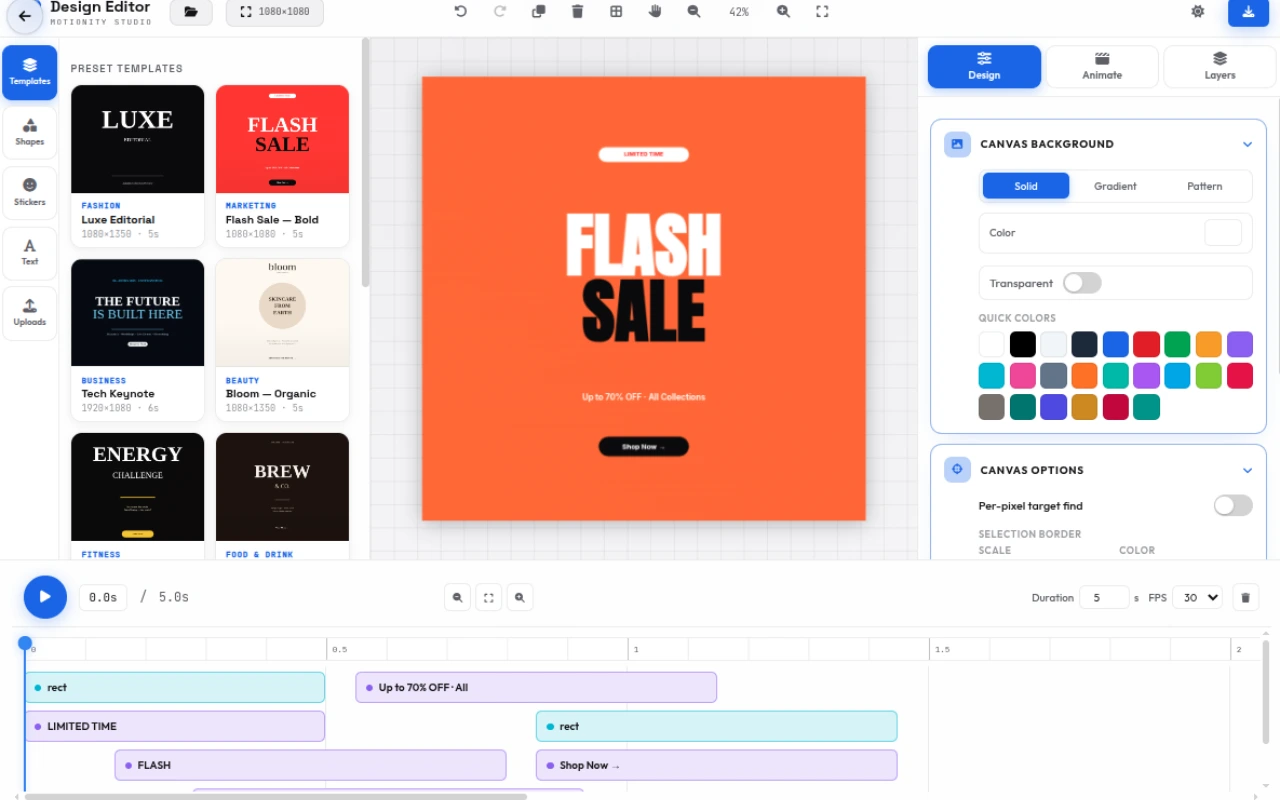
Scrub the ruler, watch every object’s in/out bars, auto-fitting duration to your longest clip, and play the whole composition back in real time.
Gradient & pattern fills
24 gradient presets (Sunset to Aurora) with linear/radial + angle control, and 20 generated SVG patterns (dots, hexagons, circuit boards) recolorable live via two pickers.
55+ Google fonts & palettes
Ten curated font categories from Inter to Monoton with live previews, plus 10 color palettes (Vibrant, Pastel, Neon, Ocean…) applied to any selected object.
SVG clipart library
50+ categorized vector cliparts — arrows, icons, shapes, nature, tech, people and emoji — added as fully editable canvas groups.
Audio tracks & uploads
Drop MP3/WAV audio onto the timeline with per-track volume, or upload images/videos as animated canvas objects with their own in/out timing.
Social presets & export
33 canvas presets (IG Post/Story/Reel, YT Thumbnail/Shorts, TikTok, Pinterest, print sizes) and export PNG/JPG up to 3× or record the animation as WebM/MP4 — no watermark.
Animations & fill systems
62 ready-to-use animations & styles across 5 categories — every one is previewable on the timeline before you export — and copied along with any object you duplicate or paste.
Entrance animations
Per-object entrances with delay + duration, eased for polish.
- Fade In
- Slide Left
- Slide Right
- Slide Up
- Slide Down
- Zoom In
- Zoom Out
- Bounce In
- Spin In
- Pop
- Flip In
- Swing In
- Elastic In
- Blur In
- Rise Up
- Scale In
- Fall In
- Glide In
- Reveal Up
- Reveal Down
Exit animations
Timed exits that hand off cleanly after the entrance.
- Fade Out
- Slide Left
- Slide Right
- Slide Up
- Slide Down
- Zoom Out
- Spin Out
- Bounce Out
- Flip Out
- Shrink Out
- Blur Out
- Fall Down
- Glide Out
- Slide Fade
- Scale Out
Loop / add-on
Continuous loops that run while the object is on screen.
- Pulse
- Wiggle
- Spin Loop
- Bounce Loop
- Tilt
- Shake
- Swing
- Float
- Flash
- Heartbeat
- Wave
- Jello
- Rubber
- Pendulum
- Flicker
Templates
One-click starting points sized for their target platform.
- Instagram Story Promo
- YouTube Intro
- Quote Card
- Product Showcase
- Event Invitation
- Minimal Text Reveal
Fill styles
Solid, gradient and pattern paint systems for every object.
- Solid colors
- 24 gradient presets
- Linear + radial
- Angle control
- 20 SVG patterns
- Live pattern recolor
How to use
A quick walkthrough, step by step.
Choose a canvas size
Pick a preset from the toolbar dropdown — Instagram, YouTube, TikTok, LinkedIn, print sizes and more.
Or start from a ready-made template in the Templates tab; it sets size, background and objects at once.
Add content
Use the Shapes and Text tabs for headings and geometry, or browse 50+ SVG cliparts by category.
Upload your own images, videos and audio from the Uploads and Audio tabs.
Edit faster with clipboard & shortcuts
Select an object (or Shift+click several) and press Ctrl+C / Ctrl+V to copy & paste — the pasted copies keep every style AND their entrance/exit/loop animation settings.
Press Ctrl+D to duplicate in place, Ctrl+G to group a multi-selection, and Delete to remove one object or a whole multi-selection at once.
Nudge with arrow keys (Shift+arrow for 10px steps), toggle playback with Space, and undo/redo anytime with Ctrl+Z / Ctrl+Y.
Style everything
Select any object and open the Design tab — solid, gradient (24 presets, linear/radial, angle) or pattern fills.
Set stroke width/color, typography (family, size, weight, color, align) and exact X/Y/W/H/angle/opacity transforms.
Animate
Open the Animate tab and set delay + duration for the selected object.
Click an Entrance (Fade In → Reveal Down), an Exit, and/or a loop add-on like Pulse or Spin Loop.
Preview on the timeline
Press Space or Play to replay the whole composition.
Each object shows its in/out bars on the timeline; drag the ruler or playhead to scrub frame-by-frame. Duration auto-fits to your clips.
Export
Hit Export — choose PNG/JPG at 1×, 2× or 3× resolution, or record the animation as WebM/MP4 video.
Files download instantly — no watermark, no upload, no sign-up.
Frequently asked questions
Everything you need to know about Design Editor.
What is the Design Editor?
A browser-based motion graphics and animated design studio: a Fabric.js canvas with text, shapes, cliparts, images and video, plus per-object keyframed animations (entrance/exit/loop), a scrubbing timeline, audio tracks, and PNG/JPG/video export.
Is the design editor really free?
Yes — completely free with no sign-up, no watermark and no export limits. Everything runs locally in your browser.
Can I copy and paste objects with their animations?
Yes. Ctrl+C copies the selected object (or every object in a multi-selection) and Ctrl+V pastes an exact replica offset slightly down-right — geometry, fill, stroke, shadow, opacity, typography and all entrance/exit/loop animation settings are preserved. The pasted objects arrive selected so you can drag them into place immediately.
How do I delete multiple objects at once?
Shift+click to add objects to a selection or drag a selection box around them, then press Delete (or Backspace) — or use the toolbar trash button. Every object in the selection is removed in one step, and it’s all covered by undo (Ctrl+Z).
Which keyboard shortcuts are supported?
Space = play/pause · Ctrl+Z / Ctrl+Shift+Z / Ctrl+Y = undo/redo · Ctrl+C / Ctrl+V = copy/paste with full styles & animations · Ctrl+D = duplicate · Ctrl+G = group selection · Delete / Backspace = delete selection · Arrow keys = nudge 1px (Shift+arrow = 10px) · Esc = deselect.
What can I create with it?
Animated Instagram stories and posts, YouTube intros, quote cards, product showcases, event invites, animated banners and thumbnails — anything that combines text, shapes, images and motion.
How do animations work?
Select any object, open the Animate tab, then apply an Entrance (Fade In, Zoom In, Bounce In…), an Exit (Fade Out, Slide…), and optionally a looping add-on (Pulse, Wiggle, Spin Loop). Set the delay and duration; the timeline renders each object’s in/out window so you can see the choreography at a glance.
Which fonts are included?
Over 55 Google Fonts grouped into Sans Serif, Serif, Handwriting, Display and Monospace — from Inter and Fredoka to Bangers, Press Start 2P, Great Vibes and Monoton — each rendered live in its own typeface in the picker.
Can I use my own images, videos and audio?
Yes. Upload images (PNG/JPG/SVG) and videos from the Uploads tab, and MP3/WAV/M4A/OGG audio from the Audio tab. Audio tracks get their own timeline row with a volume control.
What export formats are supported?
PNG (with transparency) and JPG stills at 1×–3× the canvas resolution, plus animated WebM and MP4 video recorded in real time at 30 FPS. Video uses the browser’s native MediaRecorder — no server involved.
Are there templates?
Six built-in starter templates — Instagram Story Promo, YouTube Intro, Quote Card, Product Showcase, Event Invitation and Minimal Text Reveal — each pre-sized with backgrounds, typography and animations applied.
Is there undo/redo and layers?
Yes. A 40-step snapshot undo/redo history (Ctrl+Z / Ctrl+Y), a layers panel with visibility toggles, reorder and delete, plus keyboard shortcuts for everything from playback to batch delete.
Does it work offline or on mobile?
The editor is client-side only, so after first load no server is contacted. The layout is responsive — panels stack below the canvas on small screens with touch-friendly controls.
Ready to try Design Editor?
Open it and start creating in seconds.
More free tools
Explore the rest of the EditPhotosForFree toolkit.