GIF Editor
Edit, compress, merge, cut, split and convert animations in your browser — GIF, APNG, WebP, WebM and MP4 in and out, plus frames, text, shapes, filters, timeline editing and loop control. Free, private, no sign-up.
GIF Editor Features
Everything GIF Editor can do.
Any animation in, anywhere
Drop or paste a GIF, APNG, animated WebP, MP4, WebM, MOV or MKV — or a sequence of PNG/JPG images that becomes one animation. Everything is decoded on your device (mediabunny + WebCodecs for video, gifuct-js for GIFs) and composited into full frames you can edit.
A real frame timeline
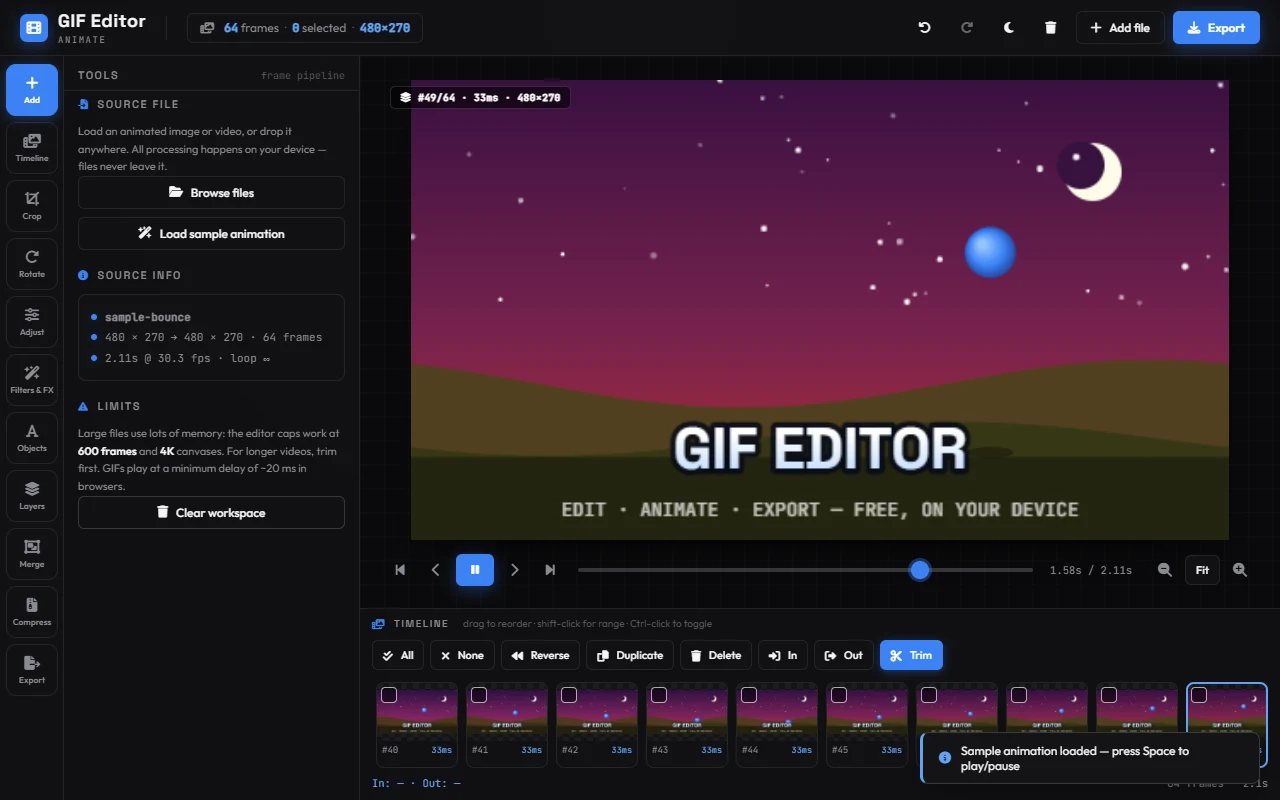
Drag-strip thumbnails: click to select (shift = range, ctrl = toggle), drag to reorder, reverse, ping-pong, duplicate and delete frames, set per-frame delays, and trim to an In–Out range — with full undo/redo (Ctrl+Z / Ctrl+Y).
Pro compression
Colors (256→16), dithering (Floyd–Steinberg), quality, and frame-drop resample — or a best-quality palette path (palettegen + paletteuse via ffmpeg) — with an optional target file size in KB that iteratively scales and re-encodes until it fits.
Convert to every format
Export GIF, APNG, animated WebP, WebM (VP9), MP4 (H.264), or a PNG sprite sheet — and come back the other way. GIF keeps transparency, loop count (∞ / once / N) and per-frame timing; videos use hardware-accelerated WebCodecs encoding.
Merge GIFs & videos
Combine the current workspace with more files: Sequential, Crossfade, Side by side, Stacked, Grid, or Overlay (picture-in-picture with anchor + opacity) — with contain/cover/stretch fit, letterbox color, delay normalization and a live merge list.
Crop, rotate, flip & shapes
Resize 1–400%, aspect presets (1:1, 16:9, 9:16…), a draggable crop box (handles + thirds grid), circle/rounded crop shapes, 90° rotations and free-angle rotation, plus horizontal/vertical flips.
Filters, adjustments & effects
Adjust brightness, contrast, saturation, hue and exposure; filter presets (B&W, Vintage, Cool, Warm, Noir…); pixel effects (sharpen, pixelate, posterize, threshold, noise, vignette) — plus 14 animated effects: Shake, Bounce, Pulse, Ken Burns, Flash, Glitch, VHS, Rain, Snow and more.
Text, shapes & stickers
Add text (8 fonts, bold, outline, shadow, opacity, blend modes, 10 entrance animations, typewriter), 6 shapes, emoji stickers and image/logo overlays — drag to position, set appear/until frame ranges, reorder layers, rotate and scale.
Split, cut & extract
Cut with In/Out marks, split every N frames, into N equal parts, or at your marks — exported as a ZIP of separate files (GIF/APNG/WebP/WebM/MP4). Or extract every frame as PNG — grid preview, click-to-download, or ZIP.
Everything the GIF Editor can do
Formats in and out, animated effects, filter presets and text animations — a quick reference.
Input formats
Decoded entirely on your device.
- GIF (with disposal methods & transparency)
- Animated APNG
- Animated WebP
- MP4
- WebM
- MOV / MKV / M4V
- PNG / JPG / BMP / AVIF image sequences
Export formats
Loop-aware where the format supports it.
- GIF (with transparency & loop)
- APNG
- Animated WebP
- WebM (VP9)
- MP4 (H.264)
- Sprite sheet PNG
Animated effects
Time-based — rendered per frame.
- Shake
- Bounce
- Pulse
- Ken Burns
- Fade in
- Fade out
- Fade in/out
- Flash
- Wobble
- Spin
- Glitch
- VHS
- Rain
- Snow
Filter presets
One-tap looks with intensity control.
- None
- B&W
- Noir
- Sepia
- Invert
- Vintage
- Cool
- Warm
- Faded
- High contrast
Text animations
Entrance motion for every text layer.
- None
- Fade in
- Slide up
- Slide down
- Slide from left
- Slide from right
- Typewriter
- Bounce
- Zoom in
- Spin in
Timeline tools
Frame-accurate editing.
- Drag to reorder
- Shift-click range select
- Reverse
- Ping-pong
- Duplicate frames
- Delete frames
- Per-frame delay
- Resample fps
- In / Out trim
- Frame split every N
- Loop ∞ / once / N
How to use GIF Editor
A quick walkthrough, step by step.
Load an animation
Drop a GIF (or an APNG, animated WebP, MP4, WebM, MOV or MKV) anywhere on the page, or click Add file and browse. PNG/JPG sequences you select together become one animation.
No file handy? Click Load sample animation for a ready-made bouncing-ball GIF and press play (Space) to preview it.
Work on the timeline
The bottom strip shows every frame: click to select (Shift = range, Ctrl-click = toggle), drag thumbnails to reorder.
Use Reverse, Ping-pong, Duplicate or Delete on the selection, set a per-frame delay, or resample to 20/15/12/10/5 fps.
Mark In/Out with the bracket buttons, then Trim to keep just that range. Space plays and pauses; Ctrl+Z undoes and Ctrl+Y redoes.
Resize, crop & transform
Crop tab: scale 1–400% (or 25/50/75/100/150/200% chips) and pick an aspect preset (1:1, 16:9, 9:16, 4:5…) or type a custom W×H.
Drag the crop box directly on the preview — corners resize it, its sides clamp to the frame; Circle and Rounded shapes add transparency.
Rotate tab: 0/90/180/270°, fine angle -180..180°, and Horizontal/Vertical flips.
Add filters, effects & objects
Adjust tab: brightness, contrast, saturation, hue and exposure. Filters & FX tab: presets (B&W, Vintage…) plus pixel effects (sharpen, posterize, noise, vignette). Effects: 14 animated looks like Shake, Bounce, Glitch and VHS.
Objects tab: add Text (font, size, outline, shadow, 10 entrance animations, appear/until frame), Shapes, Emoji stickers or an image/logo overlay. Drag them anywhere on the preview, rotate and scale them in the Layers tab.
Compress & convert
Compress tab: pick colors (256→16), dithering and quality — or tick the best-quality palette path. Set a Target size in KB and the encoder iteratively scales and re-encodes until it fits.
Export tab: choose GIF, APNG, animated WebP, WebM, MP4 or a sprite sheet PNG. GIF/APNG/WebP keep transparency and your loop choice (∞ / once / N).
Everything is encoded on your device — nothing is uploaded.
Export, split & extract
Click Export (or the header button) and watch the progress modal — the file downloads as <name>.gif / .png / .webp / .webm / .mp4.
Split a long animation into parts (every N frames / into N parts / at your In/Out marks) — it downloads a ZIP of separate files.
Extract frames exports every frame as PNG — a grid to browse, click any frame to download it, or download all as a ZIP.
Frequently asked questions about GIF Editor
Everything you need to know about GIF Editor.
Is the GIF Editor really free and private?
Yes. Everything runs in your browser on your own device — decoding, timeline editing, rendering, encoding — and files never leave your machine. No account, no upload, no watermark. Animated WebP export uses a one-time lazy ~31 MB encoder download (cached afterwards); all other formats use small, locally bundled engines.
Which formats can I open and export?
Open: GIF, animated APNG, animated WebP, MP4, WebM, MOV, MKV/M4V, and PNG/JPG/BMP/AVIF image sequences (a multi-select becomes one animation). Export: GIF, APNG, animated WebP, WebM (VP9), MP4 (H.264), or a PNG sprite sheet. GIF keeps transparency and your loop count (∞ / once / N).
How does the compression work?
Three levers: fewer colors (256/128/64/32/16), dithering (Floyd–Steinberg or none) and quality (1 best – 30 fastest). Optionally a palettegen + paletteuse pass (via the lazy ffmpeg engine) for cleaner gradients. Set a Target size in KB and the encoder iteratively scales down and re-encodes (max ~7 passes) until the file fits — best effort is reported if the target is unreachable.
Can I turn a video into a GIF?
Yes — drop the MP4/WebM/MOV/MKV and it decodes to frames you can trim, filter and crop before exporting as GIF, APNG or animated WebP (default sampling caps at ~30 fps and 600 frames). GIF timings are rounded to centiseconds with a ~20 ms minimum per frame, which browsers enforce.
How do I merge GIFs?
Load or drop a GIF into the workspace, then use the Merge tab to add more files. Layouts: Sequential, sequential with Crossfade, Side by side, Stacked, Grid, or Overlay (picture-in-picture with position, scale and opacity). Fit: Contain (letterboxed), Cover (fill) or Stretch — and delays can be normalized across mixed-fps sources.
How do I add text to a GIF?
Objects tab → Text: type your message, pick a font (8 families), size (2–30% of width), outline, shadow, opacity and blend mode, plus an entrance animation (Fade, Slide, Typewriter, Bounce, Zoom, Spin) and an appear/until frame range. Drag the text on the preview to position it; the Layers tab reorders, rotates and scales it.
Can I split or cut a GIF?
Yes. Mark In and Out on the timeline and Trim to keep only that range; for multiple parts use Export → Split… — every N frames, into N equal parts, or at your marks — delivered as a ZIP of separate files (GIF/APNG/WebP/WebM/MP4).
What happens to transparency?
GIF, APNG and WebP keep full alpha — including circle and rounded crop shapes. GIFs with transparent corners stay transparent (the encoder maps transparent pixels to a transparent index). Video formats (WebM/MP4) have no alpha channel, so frames are composited onto the export background color you pick.
Why are my GIFs limited to ~20 ms per frame?
GIF stores delays in centiseconds and browsers clamp anything under ~20 ms. If you need faster motion, export as APNG, animated WebP, WebM or MP4 — they support 60 fps timing.
Is there a limit on size or frame count?
The editor caps work at 600 frames per animation and 2048 px canvases (larger sources are downscaled) to keep memory sane on phones. A 480×270 sample animation is preloaded so you can start instantly without a file.
Ready to try GIF Editor?
Open it and start creating in seconds.
More free tools
Explore the rest of the EditPhotosForFree toolkit.